Scribe Animator vs. whiteboard animation tools
Scribe Animator is the strongest fit in this comparison when the drawing order, object timing, camera behavior, narration relationship, and editable project source all need to remain inspectable. It is not automatically the best choice for a creator who wants the largest stock library, instant character animation, enterprise localization, or a template that can be rendered with minimal editing.
This guide compares Scribe with seven representative alternatives: VideoScribe, Doodly, Vyond, Animaker, Powtoon, Canva, and Renderforest. The useful answer is not a single winner. It is a clear account of what each product is designed to make, how much authoring control it exposes, and what kind of revision will be possible after the first preview.
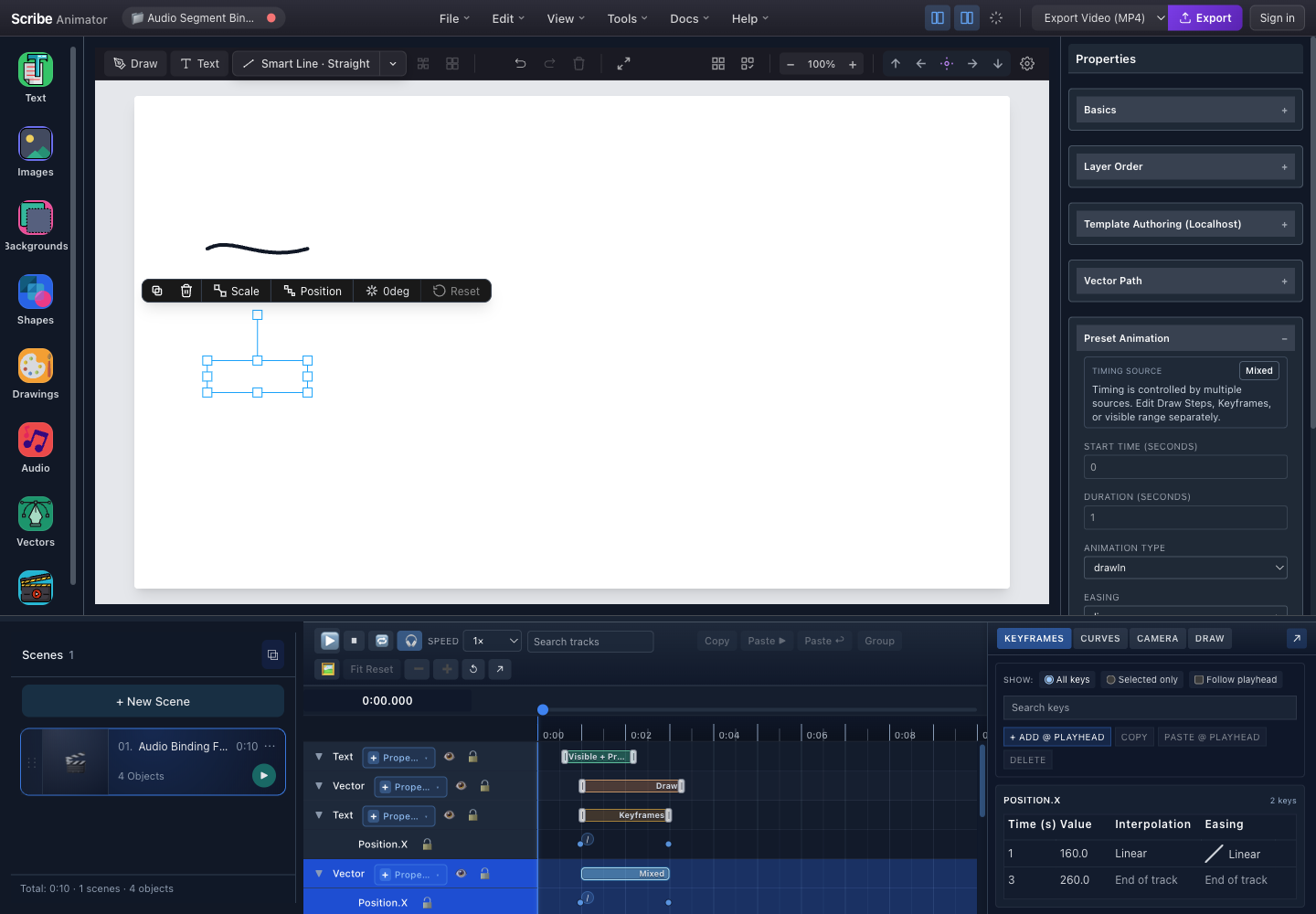
The screenshot above shows the part of Scribe that matters most in this comparison. The selected artwork is not a flattened animation. Its preset, property keys, Draw Steps, canvas object, and timeline range remain identifiable. That extra structure is useful when the project must change, but it also asks the author to make more deliberate decisions than a template-first product.
Research disclosure and scope
Last verified: 27 July 2026.
This comparison is written by the Scribe Animator team. We therefore have a product point of view, and we disclose it rather than presenting the article as an independent laboratory test.
The seven alternatives were selected because their current official product pages overlap meaningfully with whiteboard animation, doodle video, or business explainer production. This is a representative market set, not a complete directory. Competitor claims were checked against official product, help, export, and plan pages linked throughout the article.
The comparison follows four rules:
- A documented capability is not the same as a hands-on parity test. We report what a vendor's current official material clearly supports.
- “Not documented” is narrow language. It means the reviewed pages did not establish a capability at Scribe's level of detail; it does not prove that the product cannot perform a related action.
- Prices are not copied into the article. Currency, taxes, billing periods, promotions, and plan limits change. Use the linked official plan pages for a purchase decision.
- Scribe is evaluated honestly too. Missing character animation, limited offline guarantees, current export boundaries, and smaller content breadth are material differences.
Quick comparison
| Product | Creation model | Whiteboard or drawing behavior | Platform model | Choose it when |
|---|---|---|---|---|
| Scribe Animator | Editable scenes, canvas objects, timeline tracks, camera, and audio | Path-backed Draw Steps, explicit order and timing, hand/tool choices, and source-aware camera actions | Desktop web plus Mobile Lite on mobile web, iOS, and Android | The explanation needs custom vector artwork and precise, revisable draw, motion, camera, and narration relationships |
| VideoScribe | Drag-and-drop scenes, templates, media library, timeline, and review workflow | Draw and other one-click animation styles with drawing hands, pens, and erasers | Modern browsers plus a synchronized Windows/macOS application | You want a mature, approachable whiteboard workflow with a large supplied library and built-in AI assistance |
| Doodly | Installed drag-and-drop doodle editor | Automatic drawing for supplied doodles and point-and-click Smart Draw paths for imported images | Windows and macOS application, bundled with Voomly Cloud services | You want to produce a classic stock-doodle video quickly with minimal animation setup |
| Vyond | AI prompt generation plus a full business-animation studio | Broad animated, avatar, and mixed-media production; detailed whiteboard stroke scheduling was not established by the reviewed pages | Internet-required web studio plus Vyond Mobile | Character performance, avatars, localization, enterprise security, and team production matter more than path-level drawing |
| Animaker | Online animation suite with dedicated whiteboard features | Whiteboard characters, actions, expressions, templates, and a large asset catalog | Online editor plus an iOS application | You need character variety, templates, AI voice languages, subtitles, or higher-tier team features |
| Powtoon | Templates or blank canvas across presentation, cartoon, realistic, infographic, and whiteboard styles | Hand-drawn-style graphics and whiteboard templates, with motion and camera features elsewhere in the editor | Web-oriented creation platform | A presentation-led team needs whiteboard scenes alongside AI document-to-video, branding, characters, and broad sharing |
| Canva | General design and video editor with apps and templates | SpeedPaint converts an uploaded image or page into a speed-drawing video | Web, mobile, and Windows/macOS applications | Whiteboard animation is one asset inside a broader collaborative design, brand, and social-content workflow |
| Renderforest | Cloud, template, and scene assembly with AI assistance | Prebuilt whiteboard scene packs rather than a documented manual path scheduler | Browser platform plus mobile applications | Speed and template-led output matter more than building a deeply editable animation system |
The Scribe Animator baseline
Before comparing another product with Scribe, it helps to define what Scribe actually is. It is not simply a filter that makes an image look hand drawn.
A Scribe project contains scenes. Scenes contain selectable objects and their timing, drawing, camera, and audio relationships. The canvas, Properties inspector, timeline, Draw drawer, Camera drawer, and audio lanes are different views of the same project state.
For drawing, eligible vector artwork can be divided into Draw Steps. A step can identify which path or revealed range it owns, when it starts, how long it runs, which hand and tool present it, and whether a camera action belongs to that part of the drawing. Preset animation and property keyframes can also affect the same object. Scribe reports that combination as separate timing sources instead of quietly turning it into one opaque effect.
The practical benefit appears during revision. If a narrator pauses before the final branch of a diagram, the author can move or fit the relevant Draw Step. If the object also moves horizontally, its position keys remain a different timing owner. If the camera frames that step, its generated source remains visible in the camera summary.
Scribe also distinguishes delivery from editability:
- MP4 (H.264) is the current watchable video output;
- Static SVG export is unavailable in the public download menu and automation API; and
.scribepackages preserve supported editable project data and assets for backup or transfer.
Read the workspace tour, timing-source guide, and export comparison for the complete product model.
Scribe Animator vs. VideoScribe
VideoScribe's current workflow guide describes an animated-video maker that runs in modern browsers or as an installed computer application. Authors can start with a template or blank project, use scenes, add supplied or uploaded assets, choose animation styles, set camera positions, record or generate voiceover, adjust audio timing, preview, share a review link, and export in HD.
VideoScribe also documents a large media catalog, quick-start templates, drawing hands, AI script generation, AI image generation, and AI voiceover. Its download page says the Windows and macOS application is the same product used in the browser, with synchronized projects and support for continuing through a patchy connection. That wording should not be expanded into a promise of unrestricted offline authoring.
Choose VideoScribe when
- a broad supplied illustration library will save more time than custom asset preparation;
- script, image, and voice generation should sit in the same straightforward workflow;
- stakeholders need a built-in review-link path;
- a familiar drag-and-drop whiteboard process is more important than inspecting several animation authorities on one object; or
- a synchronized browser and installed-computer experience matches the team's operating model.
Choose Scribe when
- the reveal order must be authored as explicit Draw Steps;
- imported SVG or traced artwork should become editable drawing data;
- property keys and draw progress must coexist without losing their ownership;
- Object Camera, Draw-step Camera, manual camera keys, and follow modes need visible provenance; or
- the team needs a portable
.scribebackup rather than only an editable cloud project and final video.
VideoScribe is the closest dedicated whiteboard comparison in this set. Scribe should not claim a larger media library or simpler first-hour experience. Its advantage is the depth and inspectability of custom production state.
Official references: VideoScribe workflow, desktop application, and current plans.
Scribe Animator vs. Doodly
Doodly's official product page positions it as an installed Mac and PC application for creating whiteboard, blackboard, glassboard, and green-screen doodle videos through drag and drop. Supplied doodles draw automatically. For an imported image, Smart Draw lets the author create point-and-click custom draw paths.
The same page documents multiple hand types, direct voiceover recording, uploaded voiceover, royalty-free music on a timeline, and MP4 export at a range of resolutions, frame rates, and quality settings. Doodly is also sold as part of the wider Voomly Cloud suite.
Choose Doodly when
- the desired result is the recognizable classic doodle-video style;
- a supplied character, pose, prop, hand, and board-style catalog covers most scenes;
- a creator with little animation experience needs to assemble a video quickly; or
- an installed Mac/PC workflow is a stronger requirement than phone-based authoring.
Choose Scribe when
- the project needs property keyframes, easing curves, scene-aware timing, or several motion types on one object;
- a large imported vector should reveal in a deliberate narrative order rather than one custom path sequence alone;
- camera actions need to belong to manual keys, an object, or an individual drawing step;
- narration segments must explicitly fit keys, Draw Steps, or both; or
- the project must move into a constrained mobile editor using the same scene and timeline concepts.
The reviewed Doodly page does not document Scribe-equivalent timing-source precedence, generated camera-source diagnosis, audio segment binding, or a portable project-package contract. That is a statement about the reviewed source, not a claim that Doodly lacks every related control.
Scribe Animator vs. Vyond
Vyond's current product page describes two main creation paths: Vyond Go for prompt-driven instant video and Vyond Studio for full editing. Its emphasis is broader business communication rather than a dedicated whiteboard drawing engine. Documented capabilities include AI avatars, mixed media, screen and webcam recording, custom assets, translation, text to speech, and mobile creation.
Vyond's system requirements state that Studio is web based and requires internet access. Its official video-format reference documents MP4 downloads in 720p or 1080p.
Choose Vyond when
- animated characters, avatars, dialogue, or performance carry the message;
- an enterprise team needs brand management, advanced collaboration, localization, or security controls;
- screen and webcam recording need to sit beside generated or animated scenes;
- rapid prompt-to-video production is more valuable than constructing paths; or
- the organization needs a mature business-video pipeline across many authors and languages.
Choose Scribe when
- the explanation is diagram-, vector-, line-, or hand-reveal-led;
- path order and drawing time communicate the concept;
- camera movement should follow a drawing hand, moving object, or authored step;
- local processing and a downloaded editable project package matter; or
- a smaller creator wants detailed canvas control without adopting an enterprise character-video system.
Scribe does not currently offer a skeletal or puppet character-animation system comparable to a character-first platform. Vyond's reviewed product material does not establish manual path-by-path whiteboard scheduling comparable to Scribe Draw Steps. Each is strongest at a different production job.
Official references: Vyond products, plans and feature matrix, requirements, and video output.
Scribe Animator vs. Animaker
Animaker's dedicated whiteboard page documents an AI-assisted whiteboard maker with a whiteboard character builder, actions and expressions, a substantial asset catalog, reusable templates, AI voices, and multilingual subtitle support. The broader Animaker platform adds general animation, live video, a character builder, stock media, templates, and video-editing tools.
Animaker is therefore broader than a single doodle editor. It is attractive when a team wants whiteboard scenes to live beside character animation, AI media, subtitle production, and other marketing or training formats.
Choose Animaker when
- customizable characters and expressions matter more than custom vector-path behavior;
- a large template and stock-media catalog must carry production volume;
- AI voice and subtitle language coverage is a primary requirement;
- the team wants one online suite for whiteboard, general animation, and video editing; or
- higher-tier collaboration, shared-library, brand, and enterprise controls justify the workflow.
Choose Scribe when
- custom SVG, raster tracing, and drawable paths are central inputs;
- the author must inspect whether a preset, draw-progress track, Draw Step, keyframe, or audio-bound range owns the result;
- step-specific hand and camera decisions must stay editable;
- mobile and Desktop should use the same project concepts rather than selecting a separate animation format; or
- a
.scribepackage is part of the backup and handoff routine.
Animaker's reviewed whiteboard page clearly establishes assets, characters, templates, voices, and one-click production. It does not explain per-stroke scheduling, timing-source precedence, or Scribe-style camera-source conflict handling. Those controls should be described as Scribe differences, not as proof of a universal quality ranking.
Official references: Animaker Whiteboard, Animaker platform, and current plan matrix.
Scribe Animator vs. Powtoon
Powtoon's whiteboard maker supports starting from professionally designed whiteboard templates, generated content, or a blank canvas. The documented workflow includes hand-drawn-style graphics, brand colors and fonts, voiceovers, background music, and a large media library.
Powtoon's wider platform adds AI document-to-video, script writing, text to speech, avatars, translations, character tools, screen and camera recording, presentation features, collaboration, and brand controls. Its share and export guide documents HD MP4, animated GIF, presentation output, direct social sharing, and web embedding.
Choose Powtoon when
- the output sits between a presentation, training asset, and animated video;
- a document or existing presentation should become a first video draft;
- brand locking, review, collaboration, and enterprise distribution are major requirements;
- GIF or presentation-file output is essential; or
- whiteboard is only one visual style in a larger communications program.
Choose Scribe when
- the project is primarily a constructed whiteboard or vector explanation;
- the author needs direct control over stroke order rather than a hand-drawn visual style alone;
- object motion, draw reveal, camera, and audio timing must be diagnosed separately;
- an editable project needs to be exported as a portable source package; or
- Mobile Lite should expose focused editing over the same underlying story structure.
Powtoon documents A-to-B motion and camera movement in its broader feature set, but the reviewed whiteboard page does not establish Scribe-equivalent Draw-step ownership or camera-source provenance. Conversely, Scribe does not currently match Powtoon's documented GIF, presentation, enterprise collaboration, character, and AI document-to-video breadth.
Official references: Powtoon platform, whiteboard maker, share and export, and current plans.
Scribe Animator vs. Canva
Canva's current whiteboard-animation feature is built around SpeedPaint. The user uploads an image or page, and the app converts it into a speed-drawing video. The result can then be customized in Canva's general video editor with text, transitions, music, sound effects, AI voiceover, icons, and graphics.
Canva also documents team editing, comments, update tracking, social sharing, presentation embedding, and MP4 download. Its broader explainer-video maker emphasizes templates, stock media, drag-and-drop editing, and desktop or mobile access.
Choose Canva when
- the organization already manages its brand, templates, social content, presentations, and video in Canva;
- one uploaded image needs a quick speed-drawing treatment;
- non-specialist collaborators must comment or edit in a familiar design environment;
- the same assets need to become posts, decks, thumbnails, and videos; or
- broad template and stock-media access is more useful than a dedicated whiteboard timeline.
Choose Scribe when
- the image should become selectable vector paths rather than only an automatically generated drawing clip;
- path grouping and reveal order need narrative control;
- several scenes need explicit object, camera, and audio relationships;
- revision requires changing one Draw Step or timing source without regenerating the treatment; or
- the project must remain reopenable as structured Scribe data.
This distinction is unusually clear: Canva's reviewed page describes automatic image/page conversion, while Scribe documents authored path scheduling. Canva is broader and easier to integrate into a general design workflow. Scribe is narrower and more controllable when the drawing process itself is the production.
Official references: Canva whiteboard animation, explainer videos, video editor, and current plans.
Scribe Animator vs. Renderforest
Renderforest's whiteboard maker is a cloud-based, browser workflow centered on ready-made scenes and customizable template packs. The vendor documents scene libraries, text, colors, transitions, uploaded artwork, uploaded voiceover, a music library, text to speech, branding, render, download, and social sharing.
The wider Renderforest platform combines video, AI generation, images, designs, logos, mockups, and websites. Its own FAQ describes the product as best suited to structured and semi-custom content rather than high-end cinematic production.
Choose Renderforest when
- a creator needs a polished template-led result quickly;
- prebuilt scenes cover the explanation with limited custom drawing work;
- video, design, logo, mockup, or website assets should come from one subscription;
- AI-assisted scene generation is more valuable than manual animation construction; or
- the team wants browser and mobile access without learning a dense timeline.
Choose Scribe when
- the composition should be built from custom objects and vector paths;
- draw order, motion properties, camera actions, and narration need direct revision;
- imported artwork must remain part of the editable project model;
- imported SVG artwork needs editable timing and rendered video delivery; or
- a portable
.scribesource is required for recovery and handoff.
Renderforest documents a large prebuilt scene workflow. The reviewed page does not document a Scribe-style path scheduler, property-key system, camera-source summary, or audio binding model. Scribe, in turn, should not claim Renderforest's speed, template volume, or broader multi-product creative suite.
Official references: Renderforest whiteboard animation, Renderforest platform, and current plans.
What is genuinely different about Scribe
The comparison becomes more useful when “more control” is translated into concrete production behavior.
1. Drawing order is project data
Scribe Draw Steps can target eligible path-backed artwork and store order, start, duration, hand/tool presentation, and optional camera behavior. Removing or moving a step changes the editable project rather than requiring a fresh generated clip.
Learn how drawing-hand reveals are planned.
2. Mixed timing remains visible
One object may carry a preset, property keys, a draw-progress track, Draw Steps, and a visible range. Scribe does not average these into a mysterious combined effect. Matching property keys override the same preset property, and targeted Draw Steps own reveal progress. The editor reports the timing-source state so the correct owner can be changed.
3. Camera decisions retain provenance
A scene can use Fixed, Track, Follow Hand, or Follow Object mode. Manual Track keys, Object Camera actions, and Draw-step Camera actions remain distinguishable. Blocking overlaps can therefore be diagnosed at their source instead of being treated as an unexplained playback error.
4. Narration can bind to existing timing
Audio binding can use a narration segment as an explicit outer range. Depending on the object's current timing source, Scribe can bind the visible range or fit property keys, Draw Steps, or both. Binding does not manufacture a second visual effect; it retimes the selected existing owners.
5. Editable transfer is separate from final delivery
The .scribe package exists because an MP4 cannot recover scenes, objects, keys, Draw Steps, camera recipes, and supported source assets. Scribe treats the rendered video, static scene SVG, local checkpoint, cloud library save, and portable package as different boundaries.
Honest Scribe limitations
A fair comparison must preserve the limits that affect a buying or production decision.
- Character animation: Scribe does not currently include a skeletal or puppet character-performance system. Vyond or Animaker is a more natural starting point when character acting drives the story.
- Catalog scale: Scribe does not claim the template, character, illustration, stock-video, or music scale published by several alternatives above.
- GIF output: The current product does not expose GIF as a finished export format. Powtoon and Animaker document GIF output in their current product or plan material.
- Video formats: Scribe currently exposes MP4 (H.264) as its video format. Static SVG and
.scribeare useful, but they do not replace other rendered-video formats. - Collaboration: Scribe's current strength is structured authoring and portable project state, not a mature real-time enterprise approval and multi-author system.
- Offline guarantee: Local saves, file intake, SVG sanitization, raster processing, preview, and supported device-oriented work can avoid mandatory cloud writes. Scribe does not yet provide a service-worker-backed promise that the complete application will reopen offline after every visit.
- Mobile density: Mobile Lite uses the same project concepts, but it is intentionally constrained. Dense curves, many simultaneous tracks, and detailed path work remain easier on Desktop.
- Speed from a template: An authored Scribe project can demand more planning than selecting a Renderforest scene pack, a Canva SpeedPaint conversion, or a prepared VideoScribe/Doodly asset.
- Audio status: Import and recording are active, while local AI voice availability varies by provider assets, language, browser or native capability, consent, and device memory.
These are not footnotes to hide. They explain when another product will produce a better result with less friction.
When to use which product
| Your primary requirement | Sensible first choice | Why |
|---|---|---|
| Custom vector diagram with exact reveal order | Scribe Animator | Draw Steps and vector-aware timing remain editable |
| Traditional doodle video with a large ready-made library | VideoScribe or Doodly | Both center the classic hand-drawn workflow and supplied assets |
| Character-led compliance or HR video in many languages | Vyond | Character, avatar, localization, screen-recording, and enterprise workflows are the documented center |
| Whiteboard characters, many voices, and template volume | Animaker | Its whiteboard page emphasizes characters, assets, templates, AI voices, and subtitles |
| Animated presentation with team branding and broad export | Powtoon | Presentation, whiteboard, character, AI, brand, and distribution tools share one platform |
| One speed-drawn asset inside a broader design campaign | Canva | SpeedPaint and the general design/video ecosystem minimize handoff |
| Fast scene-pack video with light customization | Renderforest | Its workflow is explicitly template- and scene-led |
| Object motion, Draw Steps, camera provenance, and narration binding in one project | Scribe Animator | Those timing relationships are visible and independently editable |
| Skeletal character performance | Vyond or Animaker | Scribe does not currently implement that animation domain |
| Editable project handoff as a downloaded package | Scribe Animator | .scribe is a distinct portable source boundary |
A practical evaluation before committing
Do not decide from a homepage demo alone. Build the same 20- to 30-second proof in the two or three products that match your use case.
- Use one real script paragraph, not placeholder copy.
- Add one brand font, logo, or representative custom asset.
- Include the hardest visual: a vector diagram, character scene, stock layout, or imported image.
- Record or import a short narration clip.
- Change the narration after the first preview.
- Reorder one beat or scene.
- Export at the actual destination's required format and dimensions.
- Reopen the editable source in a fresh session.
- Record which revisions were direct edits and which required regeneration or reconstruction.
- Check the official plan page only after the workflow proves suitable.
This test prevents an impressive template from hiding a painful revision path. It also prevents Scribe's control depth from becoming a feature advantage on paper when the real project only needs a quick stock scene.
For a Scribe proof, use the first-animation tutorial, then import one representative asset through the SVG and vector workflow.
Frequently asked questions
Is Scribe Animator a VideoScribe or Doodly clone?
No. The products overlap in whiteboard and drawing-hand output, but Scribe's defining model is structured scene/object state with Draw Steps, property keyframes, camera-source provenance, audio binding, and .scribe packaging. VideoScribe and Doodly place greater emphasis on approachable assembly and supplied doodle content.
Which product has the easiest route to a first whiteboard video?
That depends on the source material. Doodly, VideoScribe, Renderforest, Canva SpeedPaint, and prepared Powtoon templates can be faster when their supplied content already fits. Scribe becomes more valuable when the first draft is not the finish line and custom draw order or later revision matters.
Does Scribe have the largest asset or template library?
No. Several competitors publish substantially broader catalogs. Scribe should be selected for the behavior of its editable project, not a claim of content-library leadership.
Is Canva a direct replacement for Scribe?
Not for every project. Canva's current whiteboard feature converts an image or page into a speed-drawing video inside a broad design ecosystem. Scribe is more appropriate when the author must control individual vector paths, scene timing, camera sources, and narration relationships. Canva is more appropriate when team design reuse and fast cross-format publishing matter more.
Should a character-led explainer be made in Scribe or Vyond?
Use Vyond when character acting, avatars, dialogue, translation, and enterprise production are central. Use Scribe when the subject is best explained as a diagram or constructed drawing. A hybrid workflow can combine exported Scribe diagrams with character or recorded sections in a delivery editor.
Can Scribe work without an account or cloud upload?
Many local editing actions, checkpoints, imports, processing steps, previews, and supported exports do not require every asset to be uploaded. Some libraries, account features, and model assets require network access. The complete app is not currently promised as universally offline.
Can Scribe run on a phone?
Yes. Mobile Lite is available through mobile web and the Scribe applications for iOS and Android. It uses the same project concepts through touch-focused sheets. Desktop remains preferable for dense timeline, curve, and detailed path work.
Why are exact subscription prices omitted?
Official pricing can vary by region, tax, currency, billing period, promotion, and plan revision. The linked current plan page is safer than a copied figure that may be wrong when the article is read later.
What does “not documented” mean in this article?
It means the official pages reviewed on 27 July 2026 did not clearly describe the named capability at the compared level of detail. It is not evidence that no related feature exists. Readers evaluating a critical requirement should confirm it in the vendor's current editor, help center, or sales channel.