Multilingual handwritten text animation
To animate words in your own language as if a hand is drawing them, keep the wording editable until it is final, choose a bundled font with the required glyphs, convert the text to vector outlines, and give the resulting vector a Draw Step. The hand then follows the revealed glyph geometry.
This is a handwriting-style reveal, not a reconstruction of the natural calligraphic stroke order a fluent writer would use. The distinction matters for Hindi, Arabic, Urdu, Hebrew, and even connected Latin script fonts: Scribe can draw the verified vector lettering, but the outline route may still need planning when human penmanship semantics are important.
The language samples and screenshots on this page were reviewed on 9 August 2026 with frontend@2.0.0 in the Desktop web editor on macOS. Every language in the verified table passed its exact bundled-font glyph check and outline converter check. Hindi, Spanish, French, Arabic, Persian, Urdu, Hebrew, Polish, Turkish, and Vietnamese also completed the visible Preview → Convert → Draw Step → hand-following workflow.
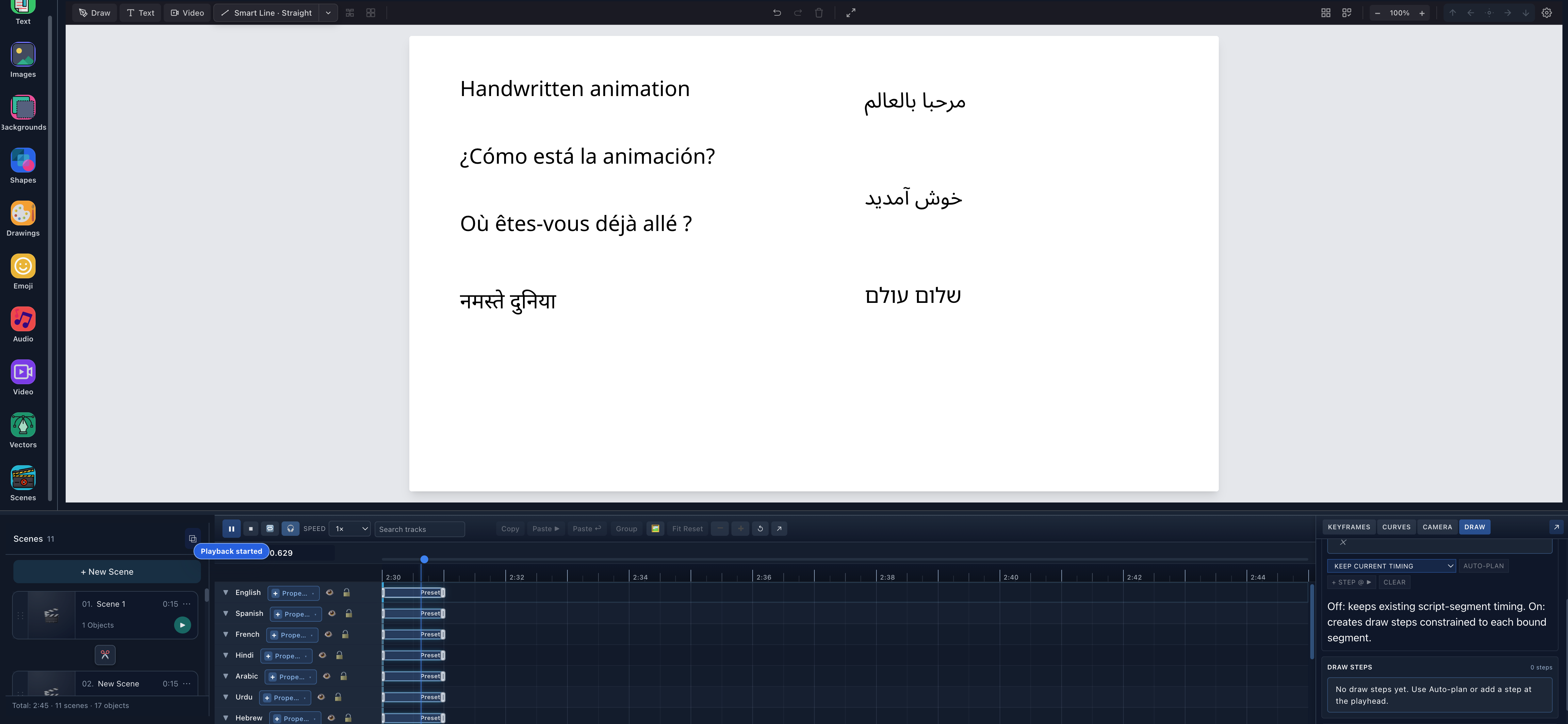
- Latin and Hindi textEnglish, Spanish, French, and Hindi remain separate editable objects on the left side of the scene.
- Arabic, Urdu, and HebrewThe right-to-left examples use their real visual order and approved bundled fonts.
- Editable text tracksLanguage names on the timeline identify the seven independent source text objects before outlining.
What makes multilingual handwriting animation possible?
Editable text and drawable vectors solve different parts of the job:
- An editable text object stores characters, a font family, size, spacing, wrapping, alignment, and color.
- Convert to outlines → Preview asks the active outliner to resolve those characters through the selected font.
- Convert replaces the text object with fixed vector/path geometry.
- Stroke planning gives that geometry a reveal order and a Draw Step.
- During playback, a selected hand or tool can follow the partial vector reveal.
The font binary is the first boundary. A font called “Noto” does not automatically contain every Noto script. The current app bundles separate files for Noto Sans, Noto Sans Devanagari, Noto Sans Arabic, and Noto Sans Hebrew, and the outliner routes complex Arabic-family and Hebrew text through its shaping path. That is why this page names verified languages and exact fonts instead of promising universal Unicode support.
For the complete control reference, see Create text, typography, and equations and SVG Text to Path / Outline.
If the wording must remain editable and a character-by-character reveal is sufficient, use Typewriter Progress keyframes instead of converting to outlines. Typewriter Progress reveals editable text; outline conversion plus a Draw Step makes a hand follow fixed glyph geometry.
Which languages can Scribe animate as handwritten text?
“Full UI workflow” means the exact sample was typed in Scribe, previewed, converted, planned into a Draw Step, and watched with the hand follower. “Verified shared lane” means the exact sample passed the bundled-font binary and real converter checks, while a representative language using that same font/script lane completed the full visible workflow.
This matrix describes text-outline coverage, not the language of Scribe's editor interface and not AI voice availability.
| Language | Script | Verified bundled font | Evidence | Hand-drawn reveal note |
|---|---|---|---|---|
| English | Latin | Noto Sans | Verified shared lane | Editable example shown in the multilingual scene |
| Spanish | Latin | Noto Sans | Full UI workflow | Inverted punctuation and accented vowels retained |
| French | Latin | Noto Sans | Full UI workflow | Grave and acute accents retained |
| German | Latin | Noto Sans | Verified shared lane | Umlauts and ß passed |
| Italian | Latin | Noto Sans | Verified shared lane | Accented vowels and curly apostrophe passed |
| Portuguese | Latin | Noto Sans | Verified shared lane | Acute accent and cedilla passed |
| Dutch | Latin | Noto Sans | Verified shared lane | Acute accents and diaeresis passed |
| Catalan | Latin | Noto Sans | Verified shared lane | Accents and curly apostrophe passed |
| Galician | Latin | Noto Sans | Verified shared lane | Accented sample passed |
| Danish | Latin | Noto Sans | Verified shared lane | ø passed |
| Norwegian | Latin | Noto Sans | Verified shared lane | å, æ, and é passed |
| Swedish | Latin | Noto Sans | Verified shared lane | ä, ö, and å passed |
| Finnish | Latin | Noto Sans | Verified shared lane | ä and ö passed |
| Icelandic | Latin | Noto Sans | Verified shared lane | Þ, æ, and accented vowels passed |
| Polish | Latin | Noto Sans | Full UI workflow | Pangram diacritics retained through drawing |
| Czech | Latin | Noto Sans | Verified shared lane | Carons and accented characters passed |
| Slovak | Latin | Noto Sans | Verified shared lane | Acute marks, carons, and circumflex passed |
| Slovenian | Latin | Noto Sans | Verified shared lane | č, š, and ž passed |
| Croatian | Latin | Noto Sans | Verified shared lane | č, ć, ž, and dž passed |
| Romanian | Latin | Noto Sans | Verified shared lane | Comma-below characters and circumflex passed |
| Hungarian | Latin | Noto Sans | Verified shared lane | Double-accent vowels passed |
| Turkish | Latin | Noto Sans | Full UI workflow | ç, ğ, dotless ı, dotted i, and ş retained |
| Vietnamese | Latin | Noto Sans | Full UI workflow | Tone marks and stacked diacritics retained |
| Indonesian | Latin | Noto Sans | Verified shared lane | Exact sample passed the shared Latin lane |
| Malay | Latin | Noto Sans | Verified shared lane | Exact sample passed the shared Latin lane |
| Afrikaans | Latin | Noto Sans | Verified shared lane | Diaeresis and circumflex passed |
| Hindi | Devanagari | Noto Sans Devanagari | Full UI workflow | Conjuncts and matras inspected through drawing |
| Marathi | Devanagari | Noto Sans Devanagari | Verified shared lane | Exact Marathi sample passed the Hindi-tested lane |
| Nepali | Devanagari | Noto Sans Devanagari | Verified shared lane | Exact Nepali sample passed the Hindi-tested lane |
| Arabic | Arabic | Noto Sans Arabic | Full UI workflow | Joined RTL shaping and draw result inspected |
| Persian | Arabic | Noto Sans Arabic | Full UI workflow | Joined RTL shaping and draw result inspected |
| Urdu | Arabic | Noto Sans Arabic | Full UI workflow | Joined RTL shaping and draw result inspected |
| Hebrew | Hebrew | Noto Sans Hebrew | Full UI workflow | RTL preview, conversion, and drawing inspected |
This is a tested sample matrix, not a statement that every possible character used by every regional orthography is present. If your sentence contains names, historical symbols, specialist marks, or another font, always use Preview and inspect every glyph.
Hindi handwriting animation
The verified Hindi sample is:
नमस्ते दुनिया
Scribe's font assist selected Noto Sans Devanagari. We set the font size to 72 px, chose No auto wrap, and opened Convert to outlines → Preview. The preview retained the conjunct and matra placement before any replacement occurred.
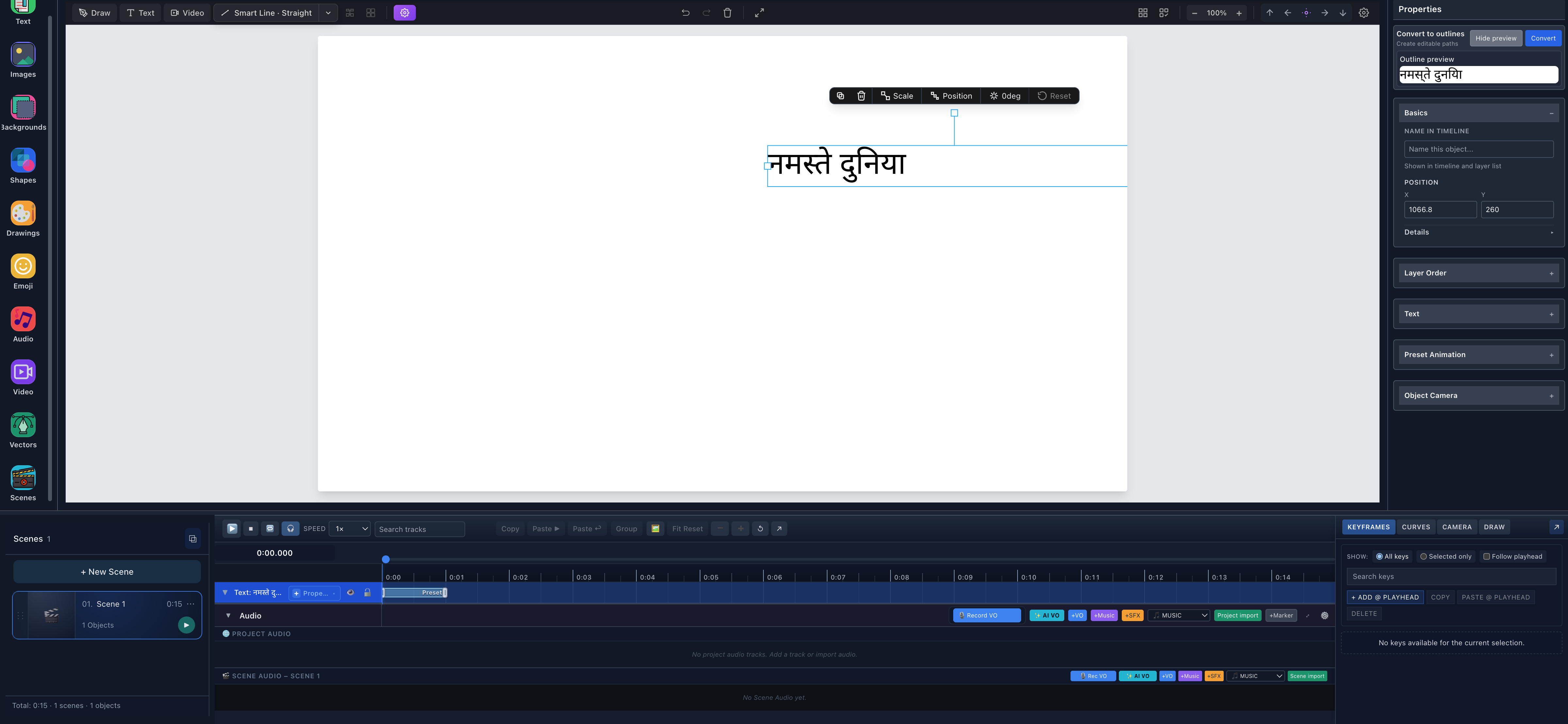
- Hindi source textThe selected object still displays नमस्ते दुनिया as live text before conversion.
- Outline previewPreview renders the candidate glyph paths without replacing the editable object.
- Text trackThe timeline still identifies the selected source as Text at this stage.
After Convert, the word remained visually complete, but the Properties panel changed from text controls to Vector Path, and the timeline track became Vector. That state change is the proof that the letters are no longer editable text.
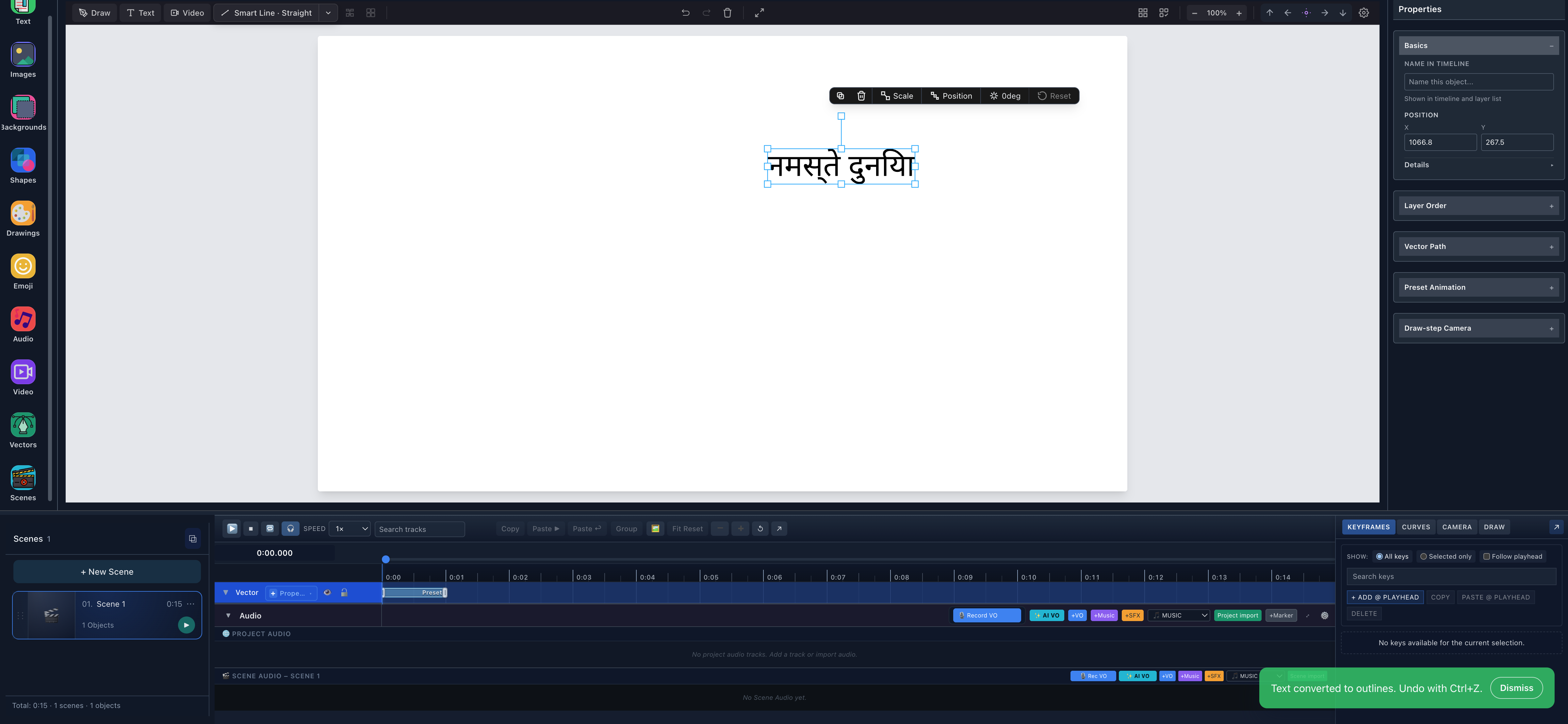
- Converted letteringThe complete Hindi result is selected as one vector object after conversion.
- Vector Path controlsText content and font controls have been replaced by path-specific properties.
- Vector trackThe timeline now identifies the replacement geometry as Vector.
Open DRAW, choose AUTO-PLAN, and plan the selected vector. The tested run created one Draw Step from 0 to 1 second. During playback, the hand followed the partial Devanagari outline and the complete sentence was visible at the end.
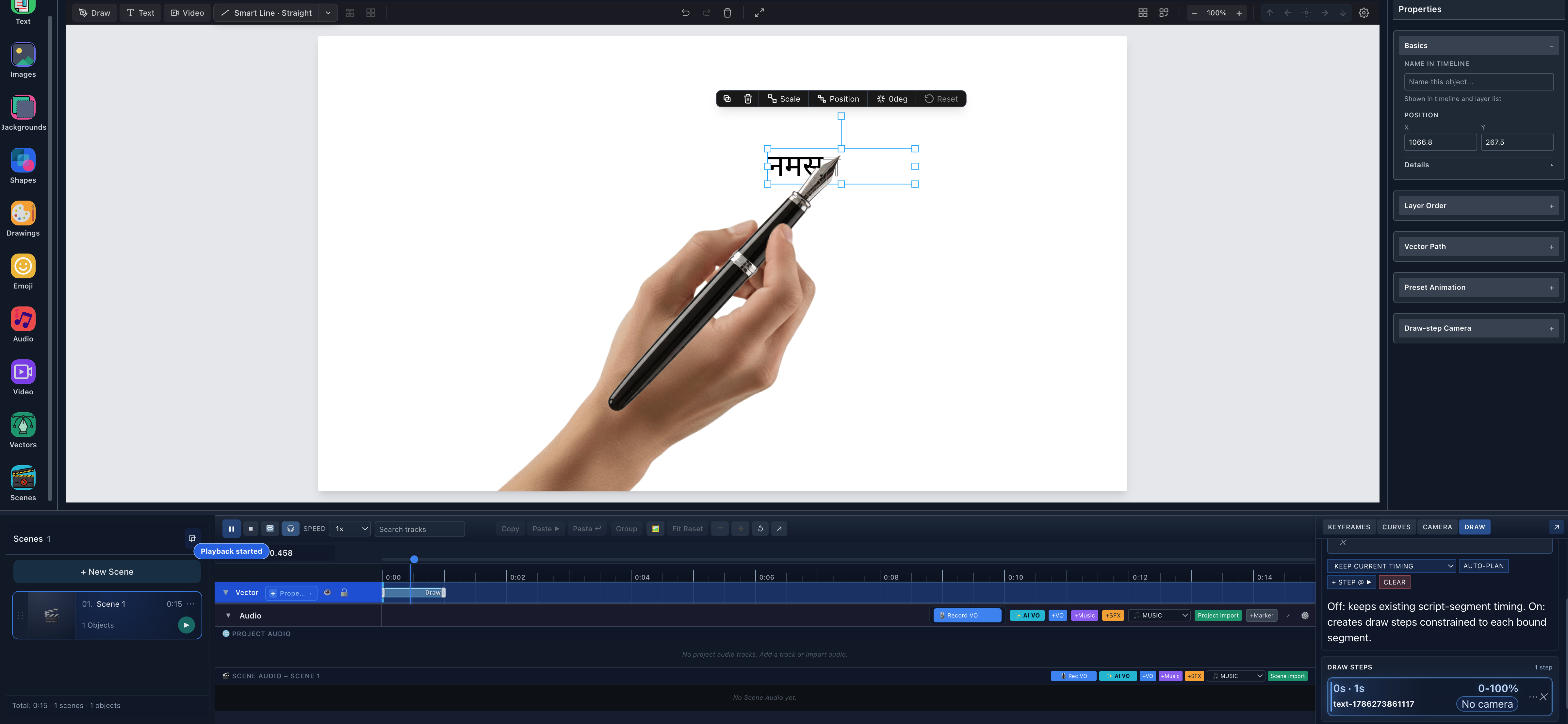
- Partial Hindi revealOnly the geometry reached by the active Draw Step is visible at this instant.
- Real hand followerThe selected hand asset tracks the active point on the vector reveal.
- 0–1 second Draw StepThe DRAW drawer records the vector-owned step used for this playback proof.
Spanish and French handwriting animation
Spanish and French use the shared Noto Sans Latin outline lane, but the verification strings deliberately include punctuation and accents that a basic ASCII test would miss:
- Spanish:
¿Cómo está la animación? - French:
Où êtes-vous déjà allé ?
Both completed the full visible workflow. The font binary contained every required glyph, Preview displayed every accent, conversion returned finite non-empty paths with no missed characters, and playback completed the sentence. Polish, Turkish, and Vietnamese were also exercised end to end to cover a denser range of Latin diacritics.
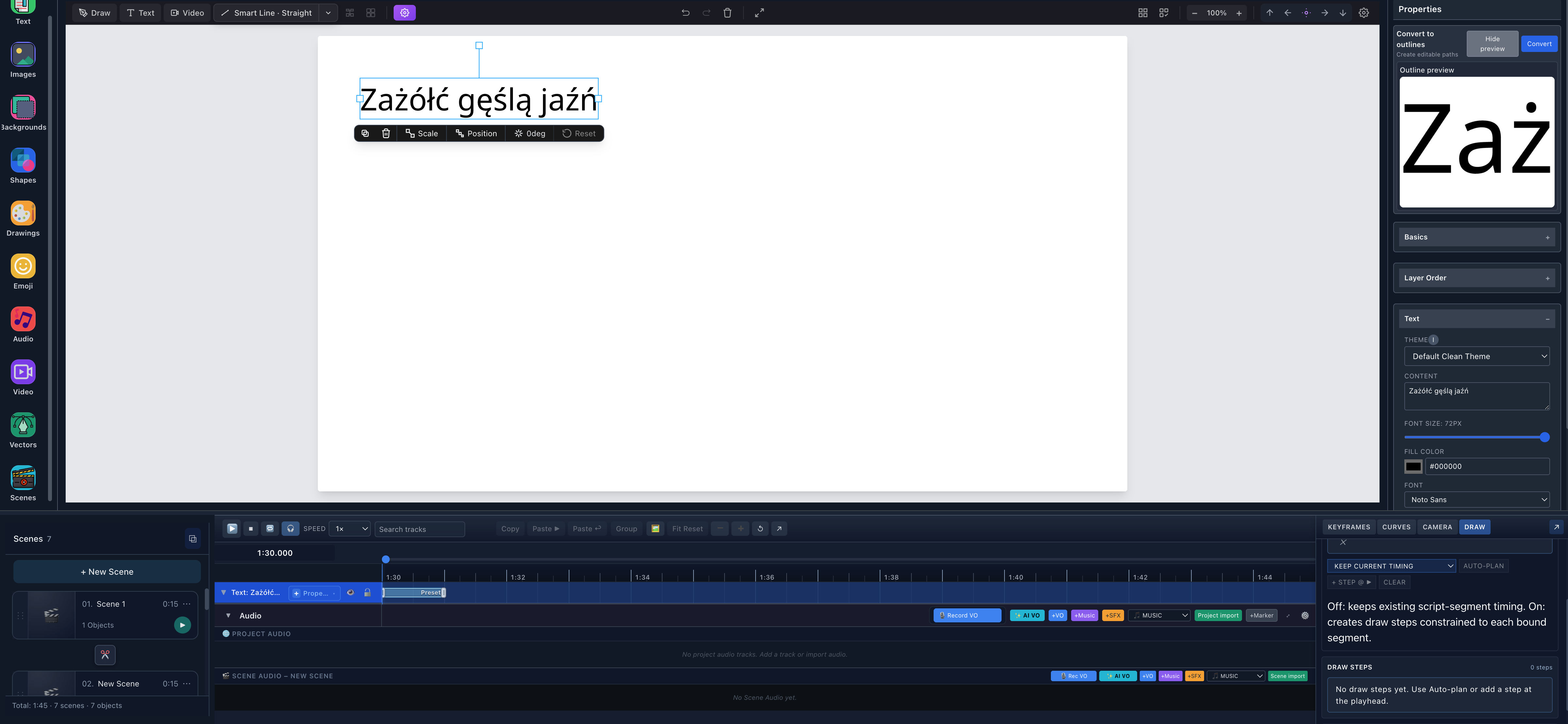
- Accented source textThe editable Polish pangram contains ż, ó, ł, ć, ę, ś, ą, ź, and ń.
- Glyph outline previewThe preview gives a close inspection surface for every accent before conversion.
- Noto SansThe selected bundled font is visible in Properties for this verified sample.
German, Portuguese, and other verified Latin languages
The same binary/converter checks passed real samples for German, Italian, Portuguese, Dutch, Catalan, Galician, Danish, Norwegian, Swedish, Finnish, Icelandic, Czech, Slovak, Slovenian, Croatian, Romanian, Hungarian, Indonesian, Malay, and Afrikaans. These names are not inferred merely because they use Latin letters: each row in the matrix corresponds to a stored sample and a complete code-point check against the current NotoSans-Regular.ttf, followed by the same outline conversion path.
If you switch to a decorative font, repeat Preview. Glyph coverage belongs to the exact font file, not to the language name or to the Noto brand in general.
Arabic handwriting animation
The verified Arabic sample is:
مرحبا بالعالم
Scribe selected Noto Sans Arabic, kept the text in its correct right-to-left visual order, and produced joined Arabic-family shapes through the complex text lane. It did not reverse the string. The editable source and the outline preview matched before conversion.
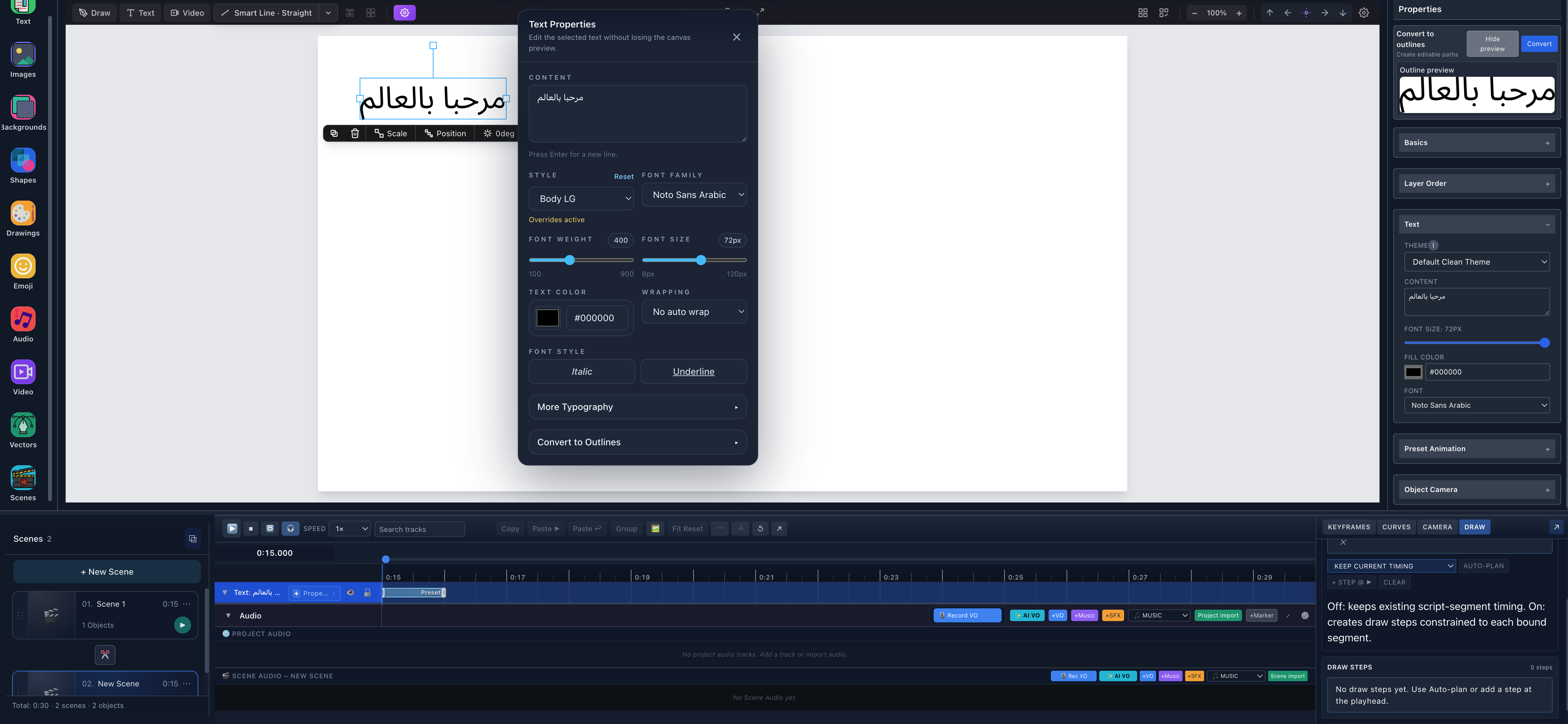
- Joined Arabic sourceThe selected editable text displays مرحبا بالعالم in its real visual order.
- Noto Sans ArabicThe approved Arabic-family outline font is selected in Text Properties.
- No auto wrapComplex outline conversion supports authored manual lines, not automatic wrapped lines.
- RTL outline previewThe preview shows joined candidate geometry before the irreversible-in-place replacement.
The Draw Step then revealed the converted shape with the hand at the active path position. Because this is an outline animation, the route follows glyph contours; it is not a promise of native Arabic calligraphic stroke order.
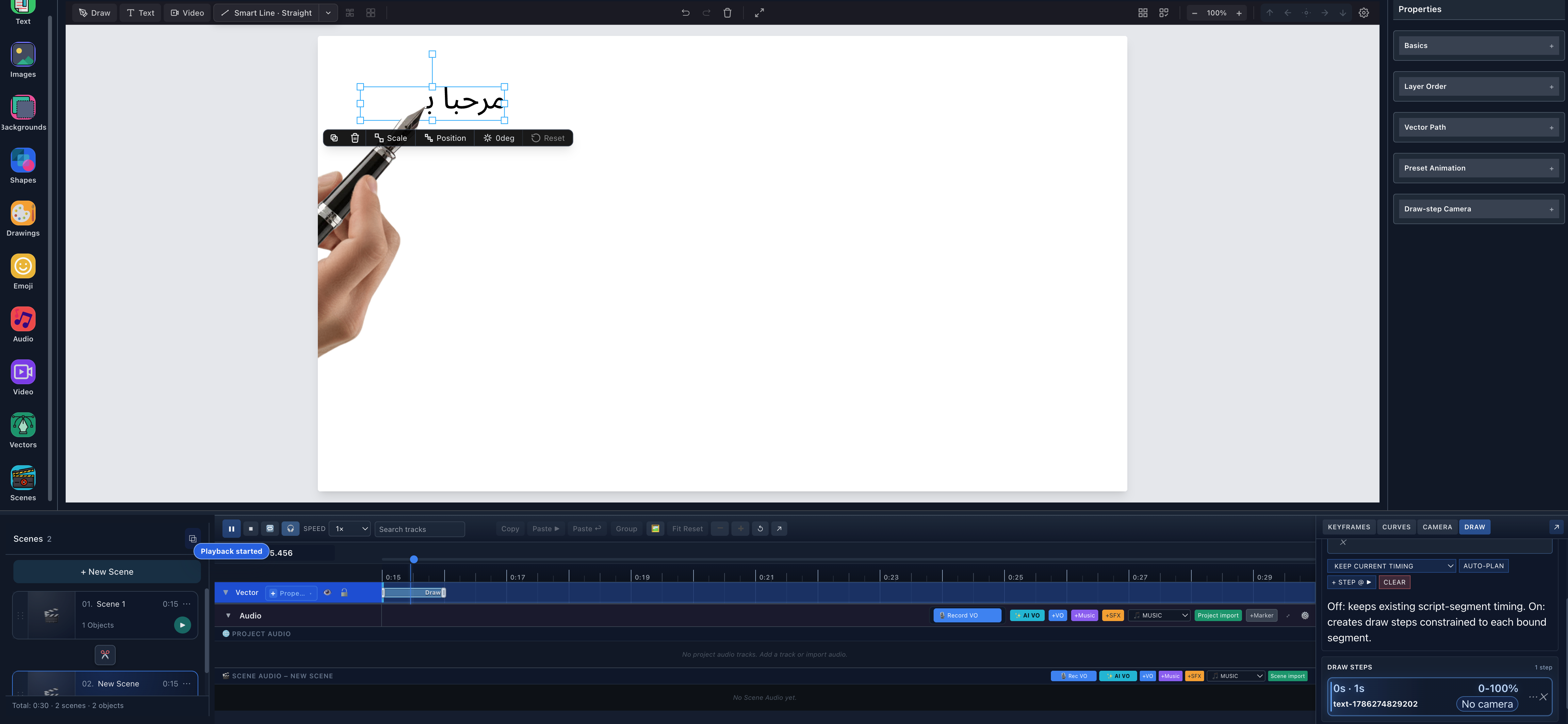
- Partial Arabic revealThe visible glyph contours correspond to the current position inside the Draw Step.
- Hand follows geometryThe hand overlay tracks the active vector point without reversing the authored text.
- Vector-owned Draw StepThe tested reveal uses one planned step on the converted object.
Persian and Urdu handwriting animation
Persian سلام دنیا and Urdu خوش آمدید each completed their own visible workflow with Noto Sans Arabic. Both retained joined Arabic-script shaping in Preview, converted into non-empty vector paths, drew under a planned step, and finished with the complete phrase visible.
The current approved Urdu route uses Noto Sans Arabic, not a Nastaliq font. That makes “Urdu text can follow the verified outline workflow” accurate; “Scribe recreates natural Nastaliq handwriting” would not be.
Hebrew handwriting animation
The verified Hebrew sample is:
שלום עולם
The workflow requires Noto Sans Hebrew. Preview and conversion kept the correct RTL result, and the hand followed the generated vector geometry. Arabic-family text and Hebrew should remain in separate text objects; a single mixed Arabic + Hebrew text object is not supported by the current outline lane.
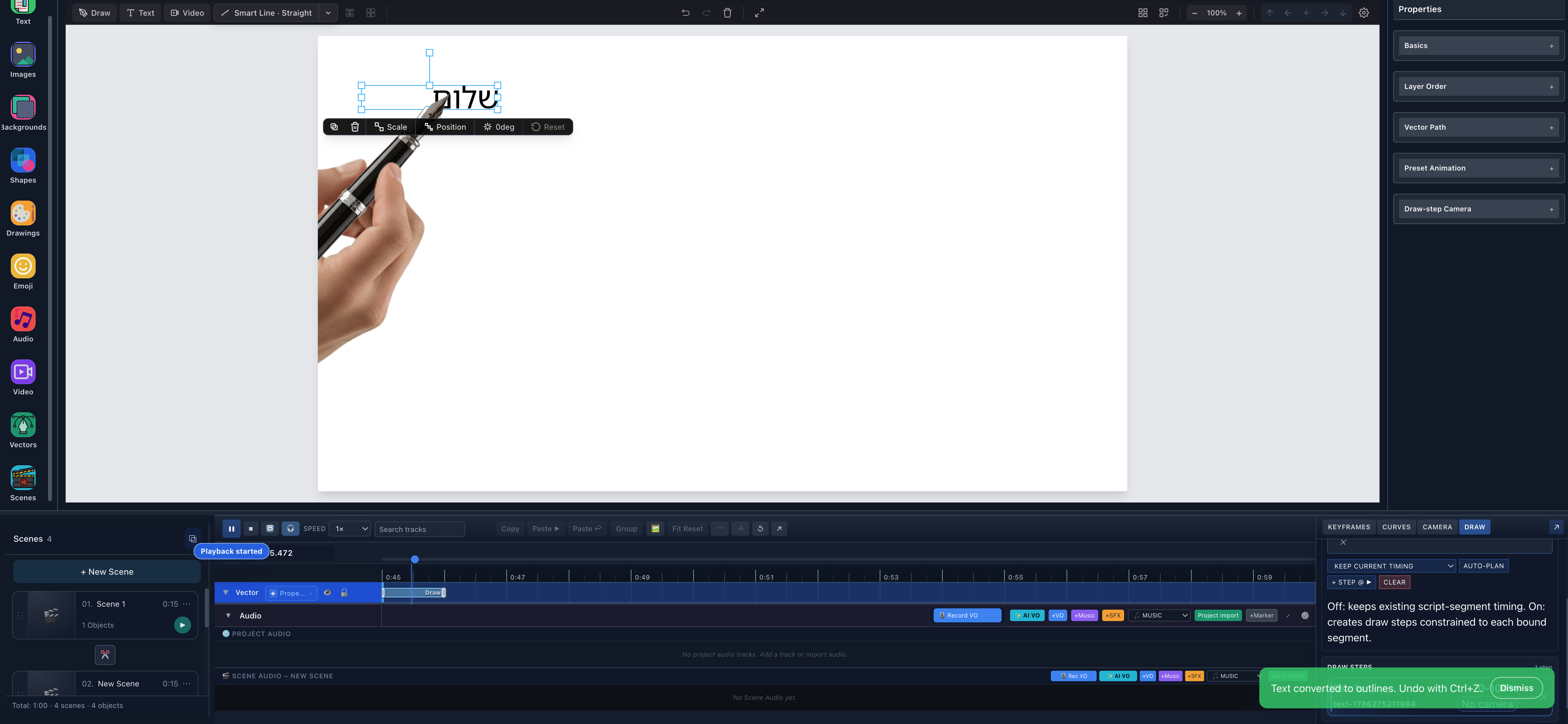
- Partial Hebrew resultThe converted Hebrew geometry is visible at an intermediate point in playback.
- Hand followerThe hand follows the vector reveal rather than a live editable text cursor.
- Vector trackThe timeline identifies the converted result as Vector during playback.
Convert text into vector outlines
Use this repeatable workflow for any language in the verified table:
- Create a clean text object and enter the final sentence.
- Confirm the recommended bundled font. Use Noto Sans for the tested Latin samples, Noto Sans Devanagari for Hindi/Marathi/Nepali, Noto Sans Arabic for Arabic/Persian/Urdu, and Noto Sans Hebrew for Hebrew.
- Inspect editable rendering. For complex RTL content, choose No auto wrap or enter deliberate manual line breaks.
- Duplicate the editable object as a recovery copy and hide or move that copy.
- Open Convert to outlines and select Preview.
- Compare every letter, diacritic, joining form, punctuation mark, space, and manual newline with the source.
- Select Convert only when Preview is complete.
- Confirm Text controls have been replaced by Vector Path controls and the timeline track says Vector.
Conversion preserves the object's placement and compatible timing references, but the wording and font controls are gone. Undo immediately or return to the duplicate if a glyph is missing.
Make the hand draw the outlined letters
- Keep the converted vector selected.
- Open DRAW and choose AUTO-PLAN, or author a step manually.
- Inspect the generated duration and path range.
- Select the project hand/tool that suits the lettering.
- Start playback before the Draw Step.
- Pause partway through and confirm the hand sits on the active glyph geometry.
- Continue past the end and confirm the entire sentence remains visible.
- If the route jumps between distant contours, split the lettering into separate objects or adjust the path/step plan.
Outlined font glyphs commonly contain an outer contour, counters, dots, marks, and disconnected accents. A path planner can order that geometry, but it cannot infer how a human writer of every script would naturally move a pen.
Languages not currently verified
The current public text-outline matrix does not claim Bengali, Tamil, Telugu, Thai, Chinese, Japanese, or Korean. Their representative samples failed the required glyph check against the tested bundled font and did not proceed to a public UI claim.
Russian and Greek samples were present in the Noto Sans binary and produced paths in the low-level probe, but Cyrillic and Greek are currently classified as unhandled by script font assist and did not complete the required visible UI/Draw Step review. They therefore remain not currently verified, not “supported because the glyph exists.”
The absence of a language from the verified table is a boundary, not evidence that no future font or engine update can support it. Preview is still the authority for the exact text and font in your project.
Current limitations
- Outlining removes editability. Keep a hidden or off-canvas editable copy until approval.
- Approved bundled fonts matter. A different font can have different glyph coverage even for a verified language.
- Automatic wrapping is unavailable for the current complex RTL outline lane. Use authored manual line breaks and inspect each line.
- Do not mix Arabic and Hebrew inside one text object. Use separate objects.
- Outlined text can create many paths. Long passages cost more to select, plan, preview, and export.
- The reveal follows glyph outlines. It does not reconstruct native calligraphic stroke order or one continuous human pen route.
- Desktop was visually verified. Mobile Lite exposes a selection-based outliner adapter where supported, but these complete language workflows and screenshots were not reproduced on Mobile Lite.
Troubleshooting
| Problem | What to check |
|---|---|
| A character disappears in Preview | Switch to the verified bundled font for that lane; do not convert a partial result. |
| Arabic, Persian, or Urdu letters are disconnected | Confirm Noto Sans Arabic, avoid automatic wrapping, and keep the original logical string order. |
| Hebrew conversion is unavailable | Confirm Noto Sans Hebrew and keep Arabic-family text in a separate object. |
| A complex line wraps unexpectedly | Choose No auto wrap or author explicit manual line breaks that fit the object width. |
| Text controls disappeared | That is expected after conversion; undo or restore the editable duplicate to change wording. |
| Hand movement looks unlike natural writing | Re-plan, split the text, or accept the result as an outline reveal rather than semantic handwriting. |
| Diacritics draw far from their letters | Inspect path order and separate the phrase into smaller objects/steps when needed. |
Text language, editor language, and voice language are separate
Editor UI localization controls the language of menus and buttons. Typed text language is the content you place on the canvas. Text-outline support determines whether a selected font and converter can turn that content into paths. AI voiceover has its own model and language matrix.
A language can therefore work for text drawing without being available in every voice engine, and vice versa. Review voiceover and synchronization separately; this article does not reuse or redefine its voice-language count.
Try multilingual handwriting animation in Scribe
Open Scribe Animator, create one short phrase from the verified table, keep an editable copy, and complete Preview → Convert → AUTO-PLAN → playback before building a longer scene. The smallest successful phrase gives you a trustworthy font and path baseline for the rest of the project.
For adjacent workflows, learn how to animate an imported SVG by hand or how to turn a PNG or JPG into a hand-drawn animation.