SVG Text to Path / Outline - Complete Guide
Convert text to vector outlines for advanced animation, styling control, and font-independent rendering. This guide covers the Text Outliner feature for transforming editable text into SVG paths.
Overview
The Convert to Outlines feature transforms text objects into vector paths. This is essential for:
- Draw-in animations - Hand-drawn text reveal effects
- Font independence - Export without font embedding concerns
- Advanced styling - Apply gradients, patterns, and path effects
- Precision control - Edit individual letter shapes
Multilingual text-outline coverage
The current public matrix is based on exact sample strings, actual bundled font binaries, converter output, and representative editor/Draw Step workflows—not on script-family assumptions.
| Verified language names | Script/outliner lane | Tested bundled font | Current boundary |
|---|---|---|---|
| English, Spanish, French, German, Italian, Portuguese, Dutch, Catalan, Galician, Danish, Norwegian, Swedish, Finnish, Icelandic, Polish, Czech, Slovak, Slovenian, Croatian, Romanian, Hungarian, Turkish, Vietnamese, Indonesian, Malay, Afrikaans | Latin / OpenType outline | Noto Sans | Every stored sample passed glyph and path checks |
| Hindi, Marathi, Nepali | Devanagari / OpenType outline | Noto Sans Devanagari | Hindi completed the visible Preview, Convert, Draw Step, and hand-following workflow |
| Arabic, Persian, Urdu | Complex BiDi/HarfBuzz outline | Noto Sans Arabic | Approved font required; no automatic wrapped conversion |
| Hebrew | Complex BiDi/HarfBuzz outline | Noto Sans Hebrew | Approved font required; keep Hebrew separate from Arabic-family text |
For exact samples, screenshots, evidence levels, Draw Step instructions, and the not-currently-verified list, use Multilingual handwritten text animation: Hindi, Spanish, French, Arabic, Urdu, Hebrew, and more.
Do not infer support for Bengali, Tamil, Telugu, Thai, Chinese, Japanese, Korean, Cyrillic, Greek, or another script merely because the selected family includes “Noto” in its name. Preview the exact text with the exact bundled font before converting.
Current visual orientation
Outline conversion begins from a real selected text object. Preview first: conversion replaces editable text with vector path geometry and remaps compatible timeline references.
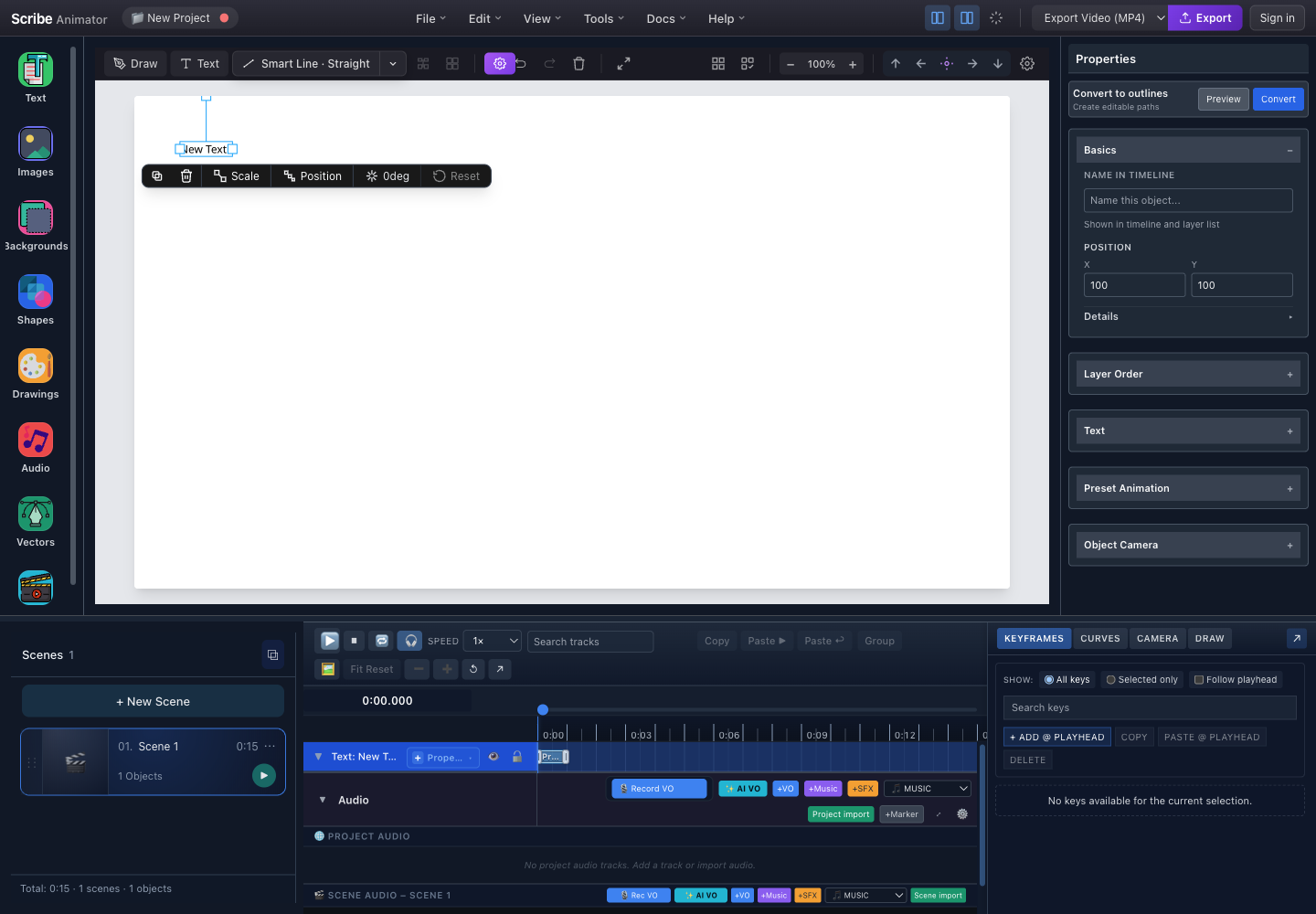
- Selected textOnly editable text objects are eligible; locked or stale selections are rejected.
- Convert to outlinesOpen the conversion controls, preview the glyph paths, then commit when the result is acceptable.
- Editable text propertiesFinish content, theme, font, size, spacing, alignment, and wrapping before conversion.
- Source timeline trackCompatible object and draw timing is remapped from the text ID to the outlined result.
This capture and the marked controls were checked against the running Desktop editor with browser-based UI review on July 26, 2026. The source implementation rejects non-text, locked, changed, or otherwise stale targets, and undo/redo reattaches selection across the replacement. For the end-to-end text workflow and current complex-script boundaries, follow Create text, typography, and equations.
The conversion has three irreversible-in-place stages: an editable text object is validated, the outliner resolves its glyph geometry, and the editor replaces it with vector paths. Undo immediately if the result is not acceptable.
Convert to Outlines Panel
Location
Select a text object → Inspector Panel → Convert to outlines section
Interface
Use the authentic annotated inspector capture above:
- Confirm the intended editable text is selected.
- Open Convert to outlines.
- Choose Preview before committing.
- Choose Convert only after the preview and source properties are correct.
Controls
| Button | Description |
|---|---|
| Preview | Shows outline preview before converting |
| Convert | Converts text to vector paths |
Preview Panel
The preview renders the actual glyph outlines that conversion would create. Check every character, spacing, holes/counters, fill, stroke, and overall bounds. A preview is not a second editable text object and does not guarantee that an unsupported glyph will convert.
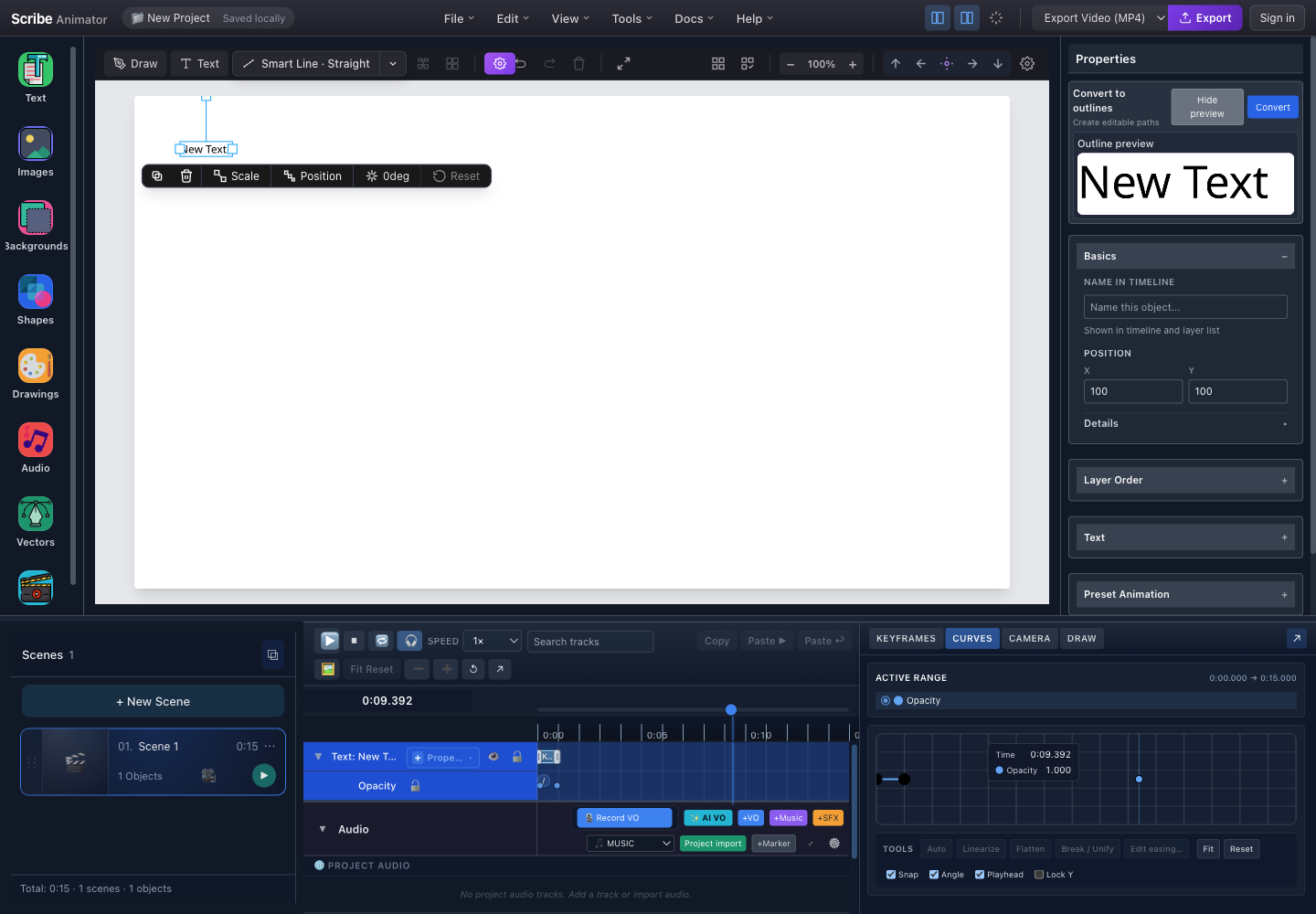
- Source textThe selected canvas object is still editable text while the preview is open.
- Preview and ConvertHide preview to return to the normal inspector, or Convert to replace the source with vector paths.
- Outline previewInspect every glyph, its spacing, counters, and overall bounds before committing.
Conversion Process
Step-by-Step
- Finish the text content, font, size, spacing, alignment, wrapping, fill, and stroke.
- Select the source text and confirm the inspector and timeline refer to the same object.
- Choose Preview and inspect all glyphs.
- Choose Convert. The engine loads the project font, extracts glyph outlines, and creates SVG path geometry.
- Confirm the text was replaced, compatible transforms and colors were preserved, the selection follows the replacement, and compatible timeline references were remapped.
- Test undo and redo before continuing.
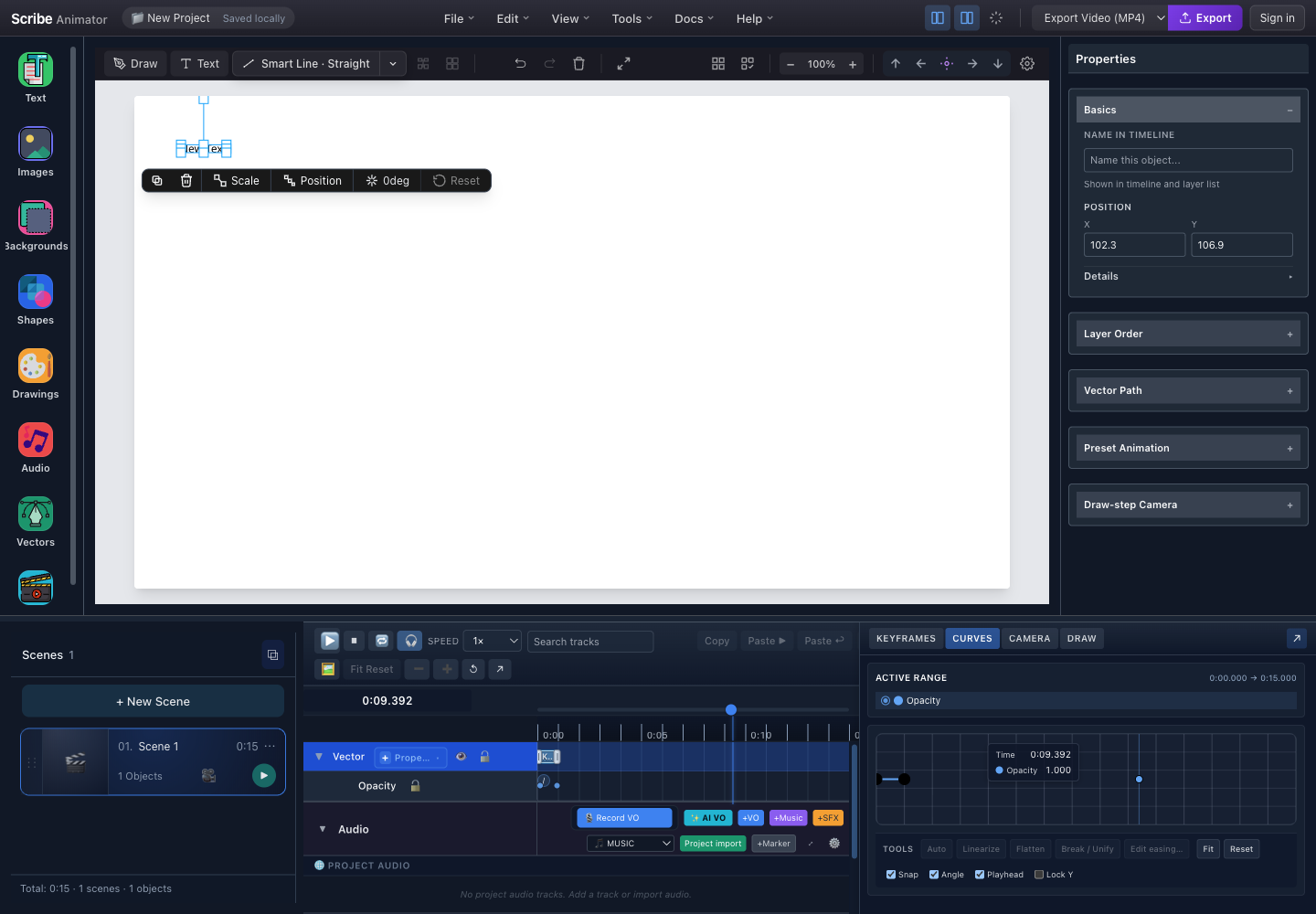
- Converted geometryThe selection follows the replacement, but its letters are now vector geometry rather than editable text.
- Vector PathPath-specific controls are available after conversion; text content and font controls are no longer applicable.
- Draw-step CameraThe outlined result can participate in vector draw and camera workflows supported by the editor.
- Vector timeline trackCompatible timing now belongs to the replacement vector object.
What Happens During Conversion
| Step | Description |
|---|---|
| Font Loading | Required font file loaded from project fonts |
| Text Parsing | Text content, size, weight, style extracted |
| Glyph Tracing | Each character converted to vector path |
| Path Assembly | Paths grouped preserving layout |
| Store Update | Text object replaced with outlined paths |
Supported Fonts
The outliner has configured sources for Scribe's bundled font catalog. The language evidence on this page is narrower: it verifies the following exact files and lanes.
| Font | Verified use | Converter lane |
|---|---|---|
| Noto Sans | The named Latin-language samples in the matrix above | OpenType outline |
| Noto Sans Devanagari | Hindi, Marathi, and Nepali samples | OpenType outline |
| Noto Sans Arabic | Arabic, Persian, and Urdu samples | Approved complex BiDi/HarfBuzz outline |
| Noto Sans Hebrew | Hebrew sample | Approved complex BiDi/HarfBuzz outline |
Other configured bundled sources include Jumps Winter, Hind, Mukta, Kalam, Noto Serif, Noto Serif Devanagari, and Tiro Devanagari Hindi variants. Their presence is not a substitute for checking the glyphs in your exact sentence.
Use a bundled font that Preview can resolve. The current public workflow does not promise arbitrary system, web, or uploaded-font outlining.
What Gets Preserved
Properties Maintained
| Property | After conversion |
|---|---|
| Position, transform, opacity, and layer order | Preserved on the replacement where supported |
| Fill, stroke, and stroke width | Copied into generated path styling |
| Compatible object and draw timing | Remapped from the source object ID |
| Editable text content | Lost; glyphs become fixed geometry |
| Font family and font size controls | No longer applicable; the font shape is embedded in paths |
| Text alignment, wrapping, and character editing | Lost; edit these before conversion |
Path Structure
Each character becomes one or more paths.
| Path field | Purpose |
|---|---|
id | Stable path identity within the replacement |
d | SVG path geometry |
fill, stroke, strokeWidth | Inherited appearance |
fillRule | Defines how overlapping contours create filled regions |
len | Measured path length used by draw animation |
bbox | Local x, y, width, and height bounds |
Use Cases
1. Draw-In Animation
Convert text to paths for a hand-drawn reveal effect:
- Create and finish the editable text.
- Convert it to outlines.
- Apply the supported Draw-In animation to the resulting path object.
- Preview the hand and draw order before export.
2. Gradient Fill
Editable text uses its supported text fills. After outlining, path-compatible styling can apply a gradient across the generated geometry. Preview counters and overlapping contours because the fill rule affects the result.
3. Font-Free Export
Export animations without font embedding issues:
| Without Outlining | With Outlining |
|---|---|
| Font file required | No font required |
| Text may render differently | Always renders correctly |
| Larger file if embedding | Paths self-contained |
Status Messages
Success
The confirmation reads Text converted to outlines. Use Ctrl+Z or
Command+Z immediately if you need the editable text back.
Partial Success
The warning explains that the current outline font does not support one or more characters and that those characters were skipped. Inspect the result for missing glyphs; undo the conversion before trying another font.
Error
If conversion produces no paths, the editor reports Could not convert text to outlines and leaves the source text unchanged. Confirm that the selected object contains text and that its font is available, then try again.
Undo/Redo
Conversion is a single atomic operation:
| Action | Keyboard | Effect |
|---|---|---|
| Undo | Ctrl+Z / ⌘+Z | Restores original editable text |
| Redo | Ctrl+Shift+Z / ⌘+Shift+Z | Re-applies outlined paths |
After undo, your original text is restored exactly as before - all editing capabilities return.
After conversion
After conversion, the Properties panel identifies the replacement through its Vector Path controls, and the timeline track is labeled Vector. The usual path controls remain available:
| Control | What it changes |
|---|---|
| Mode | The path's animation mode, such as Standard |
| Speed | Whether timing is duration-based and the corresponding value |
| Stroke | The path's stroke color |
| Width | The stroke width |
The project also retains internal outline metadata used by compatible timing and rendering paths, but the user-facing proof is the switch from editable text controls to Vector Path controls. After reload, treat it like other fixed vector geometry.
Limitations
Selection Rules
| Selection | Convert Available? |
|---|---|
| Single unlocked text object | ✅ Preview and Convert |
| Multiple unlocked text objects | ✅ Batch Convert; no combined preview |
| Mixed selection (text + non-text) | ✅ Eligible text can convert; non-text objects are reported as skipped |
| Locked text | ⚠️ Skipped until unlocked |
| Non-text only | ❌ No eligible text action |
Font Support
| Scenario | Behavior |
|---|---|
| Verified bundled font and sample | ✅ Covered by the current evidence matrix |
| Another bundled font | ⚠️ Preview every glyph before converting |
| System or arbitrary web font | ❌ Not part of the current public outline contract |
| Custom uploaded font | ❌ Not part of the current public outline contract |
Character Support
| Character group | Current evidence |
|---|---|
| Named Latin-language samples | ✅ Verified with Noto Sans, including accented Western European, Central/Eastern European, Turkish, and Vietnamese characters |
| Hindi, Marathi, and Nepali samples | ✅ Verified with Noto Sans Devanagari |
| Arabic, Persian, and Urdu samples | ✅ Verified through the approved Noto Sans Arabic complex lane |
| Hebrew sample | ✅ Verified through the approved Noto Sans Hebrew complex lane |
| Emoji and unlisted scripts | ❌ Not a public support claim; inspect Preview and use the maintained language matrix |
Performance
Outline cost grows with glyph count, contours, diacritics, manual lines, and the number of selected objects. Keep long passages editable and divide them into scene-sized phrases before conversion. Batch conversion prepares eligible objects concurrently, then applies successful replacements in one project history transaction; unsupported objects remain intact and are reported.
The current conversion uses local browser font assets and local outline libraries. It is not a cloud rendering service. Do not close or reload the editor while a large batch is being prepared.
Technical Details
Data Flow
- The selected
SceneObjectsupplies its ID, text, font, size, spacing, wrapping, color, transform, and timing context. - The engine classifies the text. Arabic-family and Hebrew content uses the
approved complex BiDi/HarfBuzz path; other currently handled text uses the
OpenType
svg-text-to-pathpath. - The selected font binary is loaded locally. The engine lays out authored lines, shapes when required, and rejects unusable or empty geometry.
- Preview returns candidate SVG/path markup without mutating the source.
- Convert normalizes the paths and prepares a replacement. For a batch, all still-current successful replacements are applied in one transaction.
- The replacement retains the source object ID so compatible object timing, Draw Step ownership, audio bindings, undo/redo, and selection can follow it.
Failure boundaries
| Boundary | Result |
|---|---|
| Unsupported or unavailable font | Conversion remains unavailable and the text source stays intact |
| Complex text with automatic wrapping | Preview explains the limit; use manual lines or fit the object |
| Mixed Arabic and Hebrew in one object | Conversion is unavailable; split the scripts into separate text objects |
| Missing glyphs in the legacy lane | A warning reports skipped characters; inspect and undo rather than publishing a partial word |
| Object changed or locked during batch preparation | That object is reported as stale/skipped instead of being overwritten |
Best Practices
When to Convert
✅ Convert when:
- You need draw-in animation on text
- Exporting to platforms without font support
- Applying gradient/pattern fills
- Final polish before export
❌ Don't convert when:
- Text may need future edits
- Working on draft content
- Font is already embedded in export
Workflow Tips
- Finalize text first - Edit all content before converting
- Use Preview - Check outline quality before committing
- Keep original - Duplicate layer before converting if unsure
- Batch deliberately - Multiple eligible text objects can convert together, but Preview high-risk scripts and unusual glyph sets one object at a time first
Troubleshooting
Outlines Look Different from Text
- Check if using a bundled font
- Verify font weight matches (Regular vs Bold)
- Preview before converting to compare
Missing Characters
- Check if font supports the characters
- Use the verified bundled font for the script lane
- For Hindi, Marathi, or Nepali use Noto Sans Devanagari; for Arabic, Persian, or Urdu use Noto Sans Arabic; for Hebrew use Noto Sans Hebrew
Conversion Fails
- Check if text object is selected (not group)
- Ensure text is not empty
- Unlock the object and confirm the selected font is available
- For complex text, remove automatic wrapping or split mixed Arabic/Hebrew objects
Undo Not Working
- Undo immediately after conversion
- Check undo history hasn't been cleared
- Reload project if undo stack corrupted