Template System
This page documents Scribe Animator's current template v1 data contract for validated imports and supported template workflows. Use this reference together with the current validator output; do not invent unsupported fields because a JSON example looks similar.
Templates package reusable animation data at three scopes:
| Type | Scope | Typical use |
|---|---|---|
scene | One complete scene | Title cards, explainers, lesson scenes, and conclusions |
block | A reusable object group, optionally with local timeline data | Callouts, icon-label groups, diagrams, and repeated content |
project | Multiple ordered scenes plus project settings | Courses, campaigns, or complete video starting points |
Current visual orientation
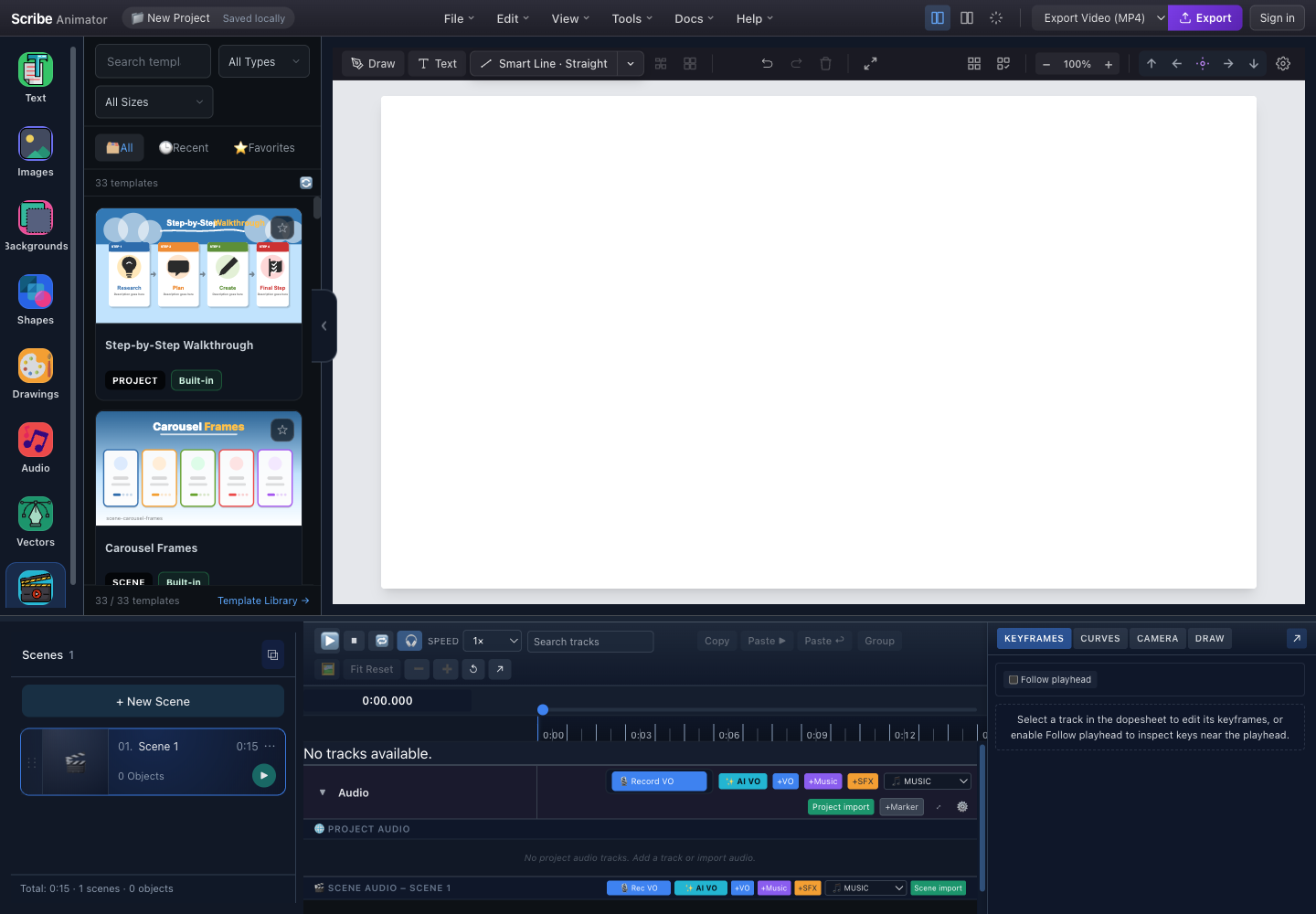
- SearchA clear name, description, and tags make a template discoverable.
- Type filterThe card category must agree with meta.type and the payload shape.
- Aspect-ratio filtermeta.aspectRatio controls where a compatible template appears.
- Preview cardsInspect preview quality, type, source, metadata, and intended scope before applying.
- Applied project stateAfter apply, confirm scene count, duration, object count, active scene, timeline, and playback.
Template v1 uses schemaVersion: 1 and
meta.timingSemantics: "scene-local-v1". For the end-to-end authoring
workflow, see Author reusable templates.
For generated input, see
Create and import AI JSON.
Envelope
Every template has metadata, a payload whose shape agrees with meta.type,
optional asset requirements, and optional authoring metadata.
interface TemplateEnvelopeV1 {
  schemaVersion: 1;
  meta: TemplateMetaV1;
  payload: SceneDTO | BlockDTO | ProjectDTO;
  requiredAssets?: AssetRef[];
  authoring?: TemplateAuthoringV1;
}
| Field | Required | Meaning |
|---|---|---|
schemaVersion | Yes | Must equal the current value 1 |
meta | Yes | Searchable identity, type, timing semantics, tags, preview, and catalog fields |
payload | Yes | A SceneDTO, BlockDTO, or ProjectDTO matching meta.type |
requiredAssets | No | Assets the host must resolve before or during apply |
authoring | No | Validated editable-slot and role metadata used by authoring-aware flows |
Metadata
| Field | Type | Required | Notes |
|---|---|---|---|
id | string | Yes | Must be non-empty; a stable lowercase identifier or UUID is recommended |
type | project, scene, or block | Yes | Selects the expected payload validator and apply behavior |
name | string | Yes | Human-readable catalog name; current validation limits it to 100 characters |
description | string | No | Explain content, audience, and intended use |
timingSemantics | scene-local-v1 | Operationally required | Current migration and builtin validation require this exact value |
tags | string array | Yes | General search keywords |
createdAt | ISO 8601 string | Yes | Creation timestamp |
updatedAt | ISO 8601 string | No | Last update timestamp |
preview | object | No | One of path, blobKey, or a small dataUrl, as supported by the store |
aspectRatio | string | No | Common values are 16:9, 9:16, and 1:1; the type permits explicit custom strings |
durationMs | number | No | Search/display duration in milliseconds |
author | string | No | Creator attribution |
packId | string | No | Groups builtin templates into a pack |
useCaseTags | controlled string array | No | Audience or workflow categories |
formatTags | controlled string array | No | Layout or communication pattern |
styleTags | controlled string array | No | Visual style categories |
Controlled tag values
| Category | Current values |
|---|---|
| Use case | education, coaching, business, marketing, storytelling, social, shorts |
| Format | title, agenda, definition, steps, comparison, timeline, flowchart, stats, quote, outro, cta, intro, bullet-list, callout |
| Style | clean-sketch, chalk, blueprint, minimal, colorful, professional |
General tags can add search terms, but controlled categories should use their
declared values so filters remain predictable.
Payload types
Scene payload
A SceneDTO describes one self-contained scene.
| Field | Required | Purpose |
|---|---|---|
width, height | Yes | Canvas dimensions |
durationMs | Yes | Scene duration in milliseconds |
objects | Yes | Portable scene objects |
name, tags, goal, notes | No | Author-facing scene metadata |
thumbnailLabel, thumbnailColor | No | Legacy/metadata hints; do not assume every current UI exposes direct editing |
transition | No | Transition into or out of the scene as defined by the timeline domain |
cameraTransition | No | Scene camera-transition settings |
drawOverrides | No | Scene-level hand-draw overrides |
background | No | Solid, gradient, image, or preset background |
timeline | No | Tracks, keys, draw steps, camera, and audio |
Use a scene template when its object positions should be interpreted against the scene's own dimensions and background.
Block payload
A BlockDTO contains objects, an optional placement anchor, and an optional
timeline snippet. The anchor gives the host a reference point when inserting
the group into an existing scene. All object, track, key, and target IDs must
remain internally consistent; apply remaps them to avoid collisions.
Use a block for content that should be inserted into an existing scene. Preview it at multiple insertion positions and with existing nearby objects.
Project payload
A ProjectDTO contains:
| Field | Required | Purpose |
|---|---|---|
name | Yes | New project name |
width, height | Yes | Project canvas dimensions |
fps | Yes | Project frame rate |
scenes | Yes | Ordered ProjectSceneDTO entries |
stylePresets | No | Optional typography, hand, background, and stroke-material preset IDs |
Each project scene extends SceneDTO with a template-local sceneId and
numeric order. Validate unique IDs, deterministic ordering, per-scene
duration, transitions, and audio across the entire project.
Object DTO
interface ObjectDTO {
  id: string;
  type: ObjectDTOType;
  x: number;
  y: number;
  width?: number;
  height?: number;
  rotation?: number;
  props: Record<string, unknown>;
  connector?: SmartConnectorMetadata;
  locked?: boolean;
  visible?: boolean;
  zIndex?: number;
  styleRefs?: {
    typographyId?: string;
    handPresetId?: string;
  };
  animationStart?: number;
  animationDuration?: number;
  timing?: SceneObjectVisibleRangeTiming;
  animationType?:
    | 'fadeIn'
    | 'slideIn'
    | 'scaleIn'
    | 'drawIn'
    | 'pathFollow'
    | 'typewriter'
    | 'none';
  animationEasing?: 'linear' | 'easeIn' | 'easeOut' | 'easeInOut';
}
id, x, y, and all timing values must be finite and valid for the target
scene. Animation start and duration use milliseconds in template v1; the
runtime converts where its internal representation differs.
Object types
| Type | Intended content | Common props or companion data |
|---|---|---|
text | Editable text | text, fontSize, fontFamily, fill, fontWeight |
svg | SVG asset | src, fill, stroke, strokeWidth |
image | Raster image | src, opacity, borderRadius |
shape | Basic shape | shapeType, fill, stroke, cornerRadius |
group | Nested object group | children or the current group representation |
drawing | Hand drawing | points, stroke, strokeWidth |
videoEmbed | Embedded video | videoUrl, autoplay, muted |
svgPath | Path geometry | d, stroke, strokeWidth, fill |
smartLine | Editable connector without an arrowhead | connector metadata and style props |
smartArrow | Editable directional connector | connector metadata and style props |
For relationship diagrams, prefer smartLine and smartArrow rather than an
inline SVG imitation. They remain editable and preserve connector behavior.
See AI JSON: Smart Lines, Smart Arrows & Connectors for the exact relationship between props.smartLine, top-level connector, drawable props.paths, anchors, and reveal-only drawIn behavior. Portable ObjectDTO uses props; the .scribe runtime field properties is not a drop-in replacement.
Simple animation settings
| Value | Meaning | Limitation |
|---|---|---|
fadeIn | Opacity reveal | Verify overlap and final opacity |
slideIn | Positional entrance | Verify direction in the actual host |
scaleIn | Scale entrance | Verify the transform origin |
drawIn | Path/drawing reveal | Requires compatible vector geometry |
pathFollow | Movement along a path | Requires valid path and target references |
typewriter | Progressive text reveal | Requires compatible text behavior |
none | No simple entrance | Timeline tracks may still animate the object |
For richer animation, store first-class timeline tracks and keys rather than
trying to encode unrelated behavior in props.
Drawable object props may optionally include strokeMaterial with one of
solid, marker, chalk, pencil, crayon, dry-marker, ink-brush, or
highlighter. Omitting it preserves the compatibility Solid renderer. Keep this
separate from hand/tool preset IDs.
Scene background.type: "preset" supports canonical presetId values
whiteboard, blackboard-dark, blackboard-green, glassboard, paper,
kraft-paper, blueprint, and custom.
Legacy blackboard, greenboard, chalkboard-dark, and chalkboard-green
values are accepted on import and normalized by the runtime.
Timeline snippet
interface TimelineSnippetDTO {
  tracks?: TemplateTimelineTrackDTO[];
  keys?: TemplateTimelineKeyDTO[];
  drawSteps?: DrawStepDTO[];
  cameraMode?: 'static' | 'track' | 'follow-hand' | 'follow-object';
  cameraFollowTargetId?: string | null;
  camera?: CameraKeyframeDTO[];
  audio?: AudioClipDTO[];
}
Tracks and keys
| Structure | Required identifiers | Important fields |
|---|---|---|
TemplateTimelineTrackDTO | id, ownerId | binding, type, label/category/order, lock/visibility, bounds, defaults, easing, and metadata |
TemplateTimelineKeyDTO | id, trackId | time, numeric value, interpolation, easing, tangent mode, tangents, group, and metadata |
Apply must remap track IDs, key IDs, object owners, and any target references as one graph. A key that points to a missing track or a track that points to a missing object is invalid.
TemplateTimelineKeyDTO.time, track start/duration fields, and scene timing are
milliseconds. Validate that keys fall within the intended scene duration.
Draw steps
| Field | Purpose |
|---|---|
objectId | Template-local target object |
startMs, durationMs | Draw timing |
from, to | Optional reveal range |
targetPathId | Optional path within a multi-path object |
strokeColor | Optional draw color override |
strokeMaterial | Optional Solid, Marker, Chalk, Pencil, Crayon, Dry Marker, Ink Brush, or Highlighter override |
overrides | Hand-draw overrides |
camera | Draw-step camera behavior |
easing | Legacy v1 field; current runtime DrawStep apply ignores it |
Only target supported drawable objects and paths. Validate duration, range, camera references, and object existence before apply.
Camera
Camera mode can be static, track, follow-hand, or follow-object.
cameraFollowTargetId is a template-local object ID and must be remapped.
Each camera keyframe contains timeMs, x, y, zoom, and optional easing.
Reject invalid zoom, non-finite positions, out-of-range time, and missing
follow targets.
Audio
Each AudioClipDTO provides an assetRef, startMs, durationMs, and optional
volume. Resolve the asset before playback, constrain volume to the runtime's
supported range, and verify that scene-local clips do not unexpectedly overlap
project audio after apply.
Asset references
type AssetRefType = 'builtin' | 'imported' | 'url';

interface AssetRef {
  type: AssetRefType;
  assetId?: string;
  packId?: string;
  filename?: string;
  url?: string;
  mime?: string;
}
| Type | Required identity | Resolution behavior | Portability concern |
|---|---|---|---|
builtin | packId and assetId | Resolve through an installed builtin pack | The destination must have the compatible pack |
imported | filename or host-managed reference | Match or re-import the original project asset | A filename alone does not embed the binary |
url | url | Fetch through the host's approved resolver | CORS, availability, privacy, licensing, and URL expiry can break reuse |
Missing assets must produce visible warnings or placeholders; they must not silently become unrelated content. Do not place credentials, signed secrets, private URLs, or personal data in a template. Prefer packaged or approved builtin assets for deterministic offline behavior.
Template stores
The store contract keeps catalog access separate from template application:
interface TemplateStore {
  list(query?: TemplateQuery): Promise<TemplateMetaV1[]>;
  get(id: string): Promise<TemplateEnvelopeV1 | null>;
  save(template: TemplateEnvelopeV1): Promise<void>;
  remove(id: string): Promise<void>;
}
interface TemplateQuery {
  type?: TemplateType;
  tags?: string[];
  useCaseTags?: TemplateUseCaseTag[];
  formatTags?: TemplateFormatTag[];
  styleTags?: TemplateStyleTag[];
  aspectRatio?: TemplateAspectRatio;
  search?: string;
  packId?: string;
  limit?: number;
  offset?: number;
}
| Store | Typical source | Persistence | Notes |
|---|---|---|---|
| User store | Browser-managed user templates | IndexedDB or host adapter | Subject to quota and browser-profile isolation |
| Builtin store | Static manifest, JSON, and preview files | Application assets | Versioned with the application |
| Cloud store | Host integration | Remote service | Future or build-dependent; never required by the schema itself |
| Composite store | Delegates to available stores | Depends on child stores | Presents one catalog while preserving source identity |
Store implementations must validate before saving or returning apply-ready data. Multiple stores can contain the same human-readable name, so IDs and source badges matter.
Apply pipeline
Applying a template is a state-changing operation:
- Fetch the envelope from the selected store or validated import.
- Check schema version, timing semantics, metadata, payload/type agreement, object IDs, authoring slots, assets, camera references, draw steps, scene capabilities, and target-specific restrictions.
- Generate fresh IDs for scenes, objects, tracks, keys, and other entities.
- Rewrite every internal reference using the same ID map.
- Resolve builtin, imported, URL, and host-provided assets. Record warnings and placeholders for anything unavailable.
- Convert the payload into current runtime project and scene state.
- Apply it through the host's supported scene, block, or project command.
- Update selection, active scene, timeline, duration, and preview state.
- Verify undo/redo, save/reload, playback, export, and Mobile Lite behavior where the template claims support.
Apply modes
| Template type | Supported intent | State effect |
|---|---|---|
| Scene | Replace the current scene or use an explicitly supported import action | Uses scene dimensions, background, objects, and scene-local timing |
| Scene merge | Host-dependent | Current paths can warn or fall back; it is not a blanket v1 compatibility guarantee |
| Block | Insert at a host-provided point or anchor | Adds remapped objects and compatible local timing to the current scene |
| Project | Create or replace project state through an explicit project workflow | Applies dimensions, fps, ordered scenes, and optional style presets |
Project and scene apply can replace current state. Save the existing project and keep an undo or package recovery path before applying untrusted or experimental templates.
Save-as-template availability
A general Save as Template dialog is not currently exposed in the active main editor UI. Therefore:
- There is no current end-user screenshot or supported menu path to document.
- Do not tell users to find a Save as Template dialog.
- Do not fabricate dialog controls, preview upload, or project-save behavior.
- Do not depend on undocumented dialog controls or project-save behavior.
Built-in templates shipped with Scribe are maintained internally. External authors should create a valid envelope, validate it, and use a supported import or template-distribution workflow rather than depending on Scribe's repository layout.
Gallery behavior
The authentic gallery capture at the top of this page shows the current catalog experience.
| Control | Data it uses | What to verify |
|---|---|---|
| Search | Name, description, and tags | Expected keywords find the card without exposing internal IDs |
| Type filter | meta.type | Card, payload, and apply action agree |
| Aspect filter | meta.aspectRatio | The template fits the intended canvas |
| Tag filters | Controlled and general tags | Categories are accurate rather than merely popular |
| Source badge/filter | Store identity | Users can distinguish builtin and user content |
| Preview | meta.preview | Image is legible, representative, and not misleading |
| Apply | Envelope and host apply command | Result matches preview and remains editable |
Do not use a placeholder preview for a published builtin template. A preview must show the actual final template, not a fabricated dialog or unrelated canvas.
Validation rules
Envelope and metadata
| Rule | Failure |
|---|---|
schemaVersion === 1 | Reject unsupported versions; do not guess a migration |
meta.timingSemantics === "scene-local-v1" | Reject or migrate through the explicit supported path |
Non-empty meta.id and meta.name | Reject anonymous entries |
meta.type is scene, block, or project | Reject unknown payload types |
meta.name is within the current length limit | Report a field-level error |
meta.tags is an array of strings | Reject malformed catalog data |
meta.createdAt is valid ISO 8601 | Reject invalid timestamp metadata |
Payload shape agrees with meta.type | Reject before any project mutation |
Objects and references
| Rule | Why |
|---|---|
| Object IDs are non-empty and unique within their scope | Prevent ambiguous remapping |
x, y, dimensions, rotation, and timing are finite | Prevent corrupt layout or playback |
| Optional width and height, when supplied, are positive where required | Prevent invalid bounds |
Object type is supported and props is an object | Preserve renderer contracts |
| Track owners, keys, draw steps, camera targets, connectors, and authoring slots resolve | Prevent dangling references |
| Asset references match their declared type | Give the resolver enough information |
| Target-specific checks pass | Prevent Desktop-only content from silently breaking Mobile Lite |
Type guards
isSceneDTO(payload);
isBlockDTO(payload);
isProjectDTO(payload);

isSceneTemplate(envelope);
isBlockTemplate(envelope);
isProjectTemplate(envelope);
Type guards narrow a value after basic checks; they do not replace the full draft validator, asset resolution, capability checks, or visual review.
Authoring checklist
- Choose the smallest correct scope: block, scene, or project.
- Create stable template-local IDs and keep all references internal.
- Use
scene-local-v1timing in milliseconds. - Prefer builtin assets; list every required asset explicitly.
- Add concise metadata and controlled tags that match the content.
- Use relative block positioning and a meaningful anchor.
- Provide a real preview generated from the finished template.
- Validate before adding the manifest entry or importing.
- Apply to a disposable saved project and inspect warnings.
- Test selection, editing, timeline, camera, audio, playback, undo/redo, persistence, reload, export, and claimed platform targets.
- Confirm that source JSON and previews contain no secrets, private URLs, unlicensed media, or personal data.
Troubleshooting
| Symptom | Check | Recovery |
|---|---|---|
| Template does not appear | ID, manifest entry, store source, filters, tags, and preview path | Refresh the catalog after fixing source data |
| Type filter is wrong | meta.type and payload guard | Correct both; do not change only the card metadata |
| Apply is rejected | Schema version, timing semantics, validator report, and target profile | Fix reported fields and revalidate |
| Missing assets | requiredAssets, pack installation, filename match, URL/CORS, and resolver warnings | Package, re-import, or replace the asset through an approved resolver |
| Timeline is missing | Exported snippet, track/key graph, owner remapping, and scene duration | Repair references and reapply to a clean scene |
| Draw step is missing | Drawable target, objectId, targetPathId, and timing | Correct the target and validate again |
| Camera follow fails | Mode and remapped follow target | Use an existing compatible object or a static/track camera |
| Block is misplaced | Anchor, local coordinates, target canvas, and insertion point | Normalize relative positioning and retest |
| Scene is cropped | Template dimensions and target aspect ratio | Use a matching scene or intentionally adapt layout |
| Save to user store fails | Browser storage permission and quota | Export source JSON safely, free space, and retry |
| Preview is blank or stale | Preview path/blob/data URL and cache | Regenerate from the final template and update metadata |
| Mobile Lite warns or rejects | Unsupported audio slots, scene capabilities, object types, or layout | Simplify the template or declare Desktop-only support |
For source-level diagnosis:
const templates = await templateStore.list();
console.log('Available templates:', templates.length);

console.log('Schema version:', envelope.schemaVersion);
console.log('Template type:', envelope.meta.type);
console.log('Required assets:', envelope.requiredAssets?.length);
Avoid logging full payloads in production because object text, URLs, and metadata can contain sensitive project information.
Compatibility and non-goals
- Template v1 is internal and experimental; public compatibility guarantees are not finalized.
- Unknown schema versions must not be accepted silently.
- Cloud storage, marketplace publishing, collaborative editing, and unrestricted external script or plugin execution are not provided by this schema.
- A valid template is data, not executable code.
- URL assets remain subject to host permissions, CORS, availability, and security policy.
- SaveTemplateDialog is currently disabled/unwired and is not an end-user workflow.
The complete success criterion is not “JSON parsed.” A template is ready only when it is discoverable, accurately previewed, safely applied, editable, playable, recoverable, persistable, and exportable in every environment it claims to support.