Whiteboard animation apps for Android and iPhone (2026)
The best mobile animation app depends on what you mean by “whiteboard animation.” You may want a drawing hand to reveal vector artwork, a teacher's live pen strokes recorded with narration, a frame-by-frame cartoon, a character-led explainer, or simply a branded video template with a white background. Those are different production models, even when the finished thumbnails look similar.
This comparison covers a representative set of currently discoverable Android and iOS applications. It focuses on how each app is built to work, where it is a sensible choice, and where Scribe Animator offers more relevant control for a structured hand-drawn explainer.
Last verified: 27 July 2026.
How we selected and checked the apps
This article is written by the Scribe Animator team, so we have an obvious product perspective. We have not hidden that relationship, and we have not designed the comparison so Scribe wins every category. Explain Everything is a stronger fit for a live collaborative classroom board. FlipaClip is a more natural choice for hand-drawn frame-by-frame cartoons. Canva and Adobe Express cover a much broader range of general design work.
We built the comparison from:
- direct searches in Google Play for whiteboard animation and adjacent animation tools;
- official Apple App Store listings and related-app discovery;
- official store descriptions for editing, audio, export, device support, and commercial-model claims; and
- Scribe's current public documentation and editor behavior for its own capabilities and limitations.
The result is intentionally representative, not exhaustive. App catalogs change by country and device, similarly named apps come and go, and a store description is a vendor's current claim rather than an independent performance test. We link the official listings so you can confirm current compatibility, terms, and availability before committing a project.
We also avoid a numeric price table. Store prices, trials, credit packs, subscriptions, export entitlements, and taxes can vary by region and change faster than an editorial article.
The short comparison
| App | Mobile listings verified | Best fit | Main trade-off compared with Scribe |
|---|---|---|---|
| Scribe Animator | Android, iPhone, iPad | Authored whiteboard explainers with draw order, hands, camera, audio, and editable timing | More production control also means more decisions than a one-tap template app |
| Benime | Android | A relatively simple traditional doodle workflow with hands and offline rendering | Less explicit control over draw-step planning, camera sources, and the shared project timeline |
| Whiteboard Animation Creator | Android | Basic slide, sticker, text, hand, music, and MP4 creation | Simpler model with fewer advanced animation and revision controls |
| Flixcribir | iPhone, iPad | Lightweight iOS whiteboard creation, line conversion, and voice recording | Narrower project and timing model; its listing was less recently updated than most apps here |
| Explain Everything | Android, iPhone, iPad | Live teaching, annotation, collaboration, and recorded whiteboard lessons | Records a whiteboard process rather than authoring automatic path-by-path hand animation |
| FlipaClip | Android, iPhone, iPad | Frame-by-frame drawing, cartoons, onion skinning, and GIF/PNG output | Manual animation craft rather than scene-based explainer automation |
| Canva | Android, iPhone, iPad | Broad design, social video, templates, brand systems, and collaboration | Not positioned as a dedicated draw-path and drawing-hand editor |
| Adobe Express | Android, iPhone, iPad | Branded content, quick video editing, captions, resizing, and general creative work | General clip/template workflow rather than a whiteboard animation engine |
| Animaker | Android, iPhone, iPad | Character, avatar, prompt-led, template, and stock-based animated videos | Better aligned with character explainers than path-level whiteboard drawing |
| Renderforest | Android, iPhone | Fast template-led promos, intros, slideshows, and explainers | Less fine-grained control over individual drawing paths, hands, and camera timing |
1. Scribe Animator: when the drawing plan is part of the project
Official listings: Google Play · Apple App Store
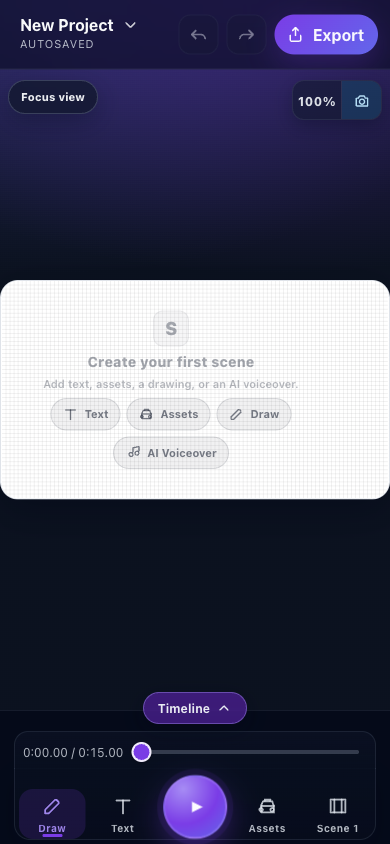
Scribe treats a whiteboard video as an editable project rather than a finished drawing captured in one pass. Scenes contain real objects. Drawable vector paths can be scheduled through Draw Steps. A hand and tool can follow those steps. Text, images, shapes, connectors, presets, property keyframes, curves, camera actions, and audio share the same timed project.
That model matters when the script changes. You can revise which object draws first, retime one step, change an object-level hand override, or remove a camera move without recreating the complete video. Raster line art can be traced into drawable paths where the source is suitable; an ordinary image can remain an image when tracing would add complexity without improving the explanation.
Scribe's mobile listing also describes on-device AI voiceover in 31 languages after the required model is downloaded, direct voice recording, imported audio, templates, multi-scene projects, raster tracing, camera movement, motion presets, keyframes, curves, and MP4 export. Projects can be kept locally or associated with an account, and the same project concepts continue into the larger desktop editor.
This makes Scribe a strong fit when:
- stroke order carries meaning;
- narration and visuals need deliberate synchronization;
- different objects require different hands, tools, or animation treatments;
- camera framing must follow a hand, object, manual track, or particular Draw Step;
- revisions are expected after the first preview; or
- the editable
.scribeproject matters as much as the delivered video.
It is not automatically the simplest option. Mobile Lite normally shows one focused sheet at a time, touch transforms are less precise than desktop work, and complex SVGs, long timelines, local voice models, or high-frame-rate exports can pressure mobile memory. The free mobile export path is currently limited to 720p with a watermark. Remote asset libraries and cloud projects require a network even though downloaded voice models and local assets support device-oriented workflows.
Read the Mobile Lite guide, drawing and Shot Planner guide, and camera comparison before planning a complex phone-only project.
2. Benime: a focused Android doodle maker
Official listing: Benime on Google Play
Benime is one of the clearer direct Android alternatives in this set. Its official listing describes a built-in visual library, customizable drawing hands, imported SVGs, GIFs and local images, motion paths, text-to-speech, background music, direct voice recording, instant preview, and offline Full HD rendering. Its AI image and voice features use a credit model, while the application also offers paid feature access.
Choose Benime when you want a traditional doodle-video workflow on Android and prefer a comparatively direct route from assets and audio to a rendered result. Its offline-rendering claim is useful for creators who do not want the final encode to depend on a continuous connection.
Choose Scribe instead when you need the drawing plan to remain inspectable as individual steps, want object and Draw-step Camera sources, need more explicit keyframe/curve control, or expect the same structured project to move between mobile and desktop. Benime's store description is broad, but it does not describe the same combination of Draw Step scheduling, camera-source resolution, and .scribe project transfer.
3. Whiteboard Animation Creator: basic slides and hand gestures on Android
Official listing: Whiteboard Animation Creator on Google Play
Whiteboard Animation Creator uses a simpler slide-oriented model. Its listing describes multiple canvas sizes, clip art, gallery images, styled text, slide backgrounds, multiple hand gestures, slide animations, local music, MP4 export, and direct sharing.
That can be enough for a short sequence assembled from stickers and text. A creator who wants to make a basic hand-led video without learning a deep timeline may find the reduced scope appealing.
Scribe is the more appropriate choice when the artwork needs vector-aware stroke reveals, automatic planning, object-level overrides, camera coordination, recorded or generated narration, reusable templates, or detailed motion timing. The difference is not that every simple app should grow a professional timeline. It is that a slide animation and an authored drawing sequence solve different revision problems.
4. Flixcribir: a lightweight iPhone and iPad whiteboard option
Official listing: Flixcribir on the Apple App Store
Flixcribir is a direct iOS whiteboard-animation app. Its listing describes an infinite canvas, multiple video sizes, automatic conversion of images to line drawings, text and image animation choices, direct voice recording, and 1080p rendering.
It is a practical option when you want a small, dedicated whiteboard tool on an iPhone or iPad and the project does not require a more elaborate scene, camera, and object-timing system. Its official page showed an older update than most products in this review, so verify current device behavior and export terms with a small test before relying on it for a deadline.
Scribe offers the broader production model: templates, drawing libraries, Draw Steps, configurable hands and tools, several camera sources, project files, AI narration, desktop continuation, and a deeper timeline. Flixcribir may still be the faster choice when the job is simply “turn a few images and lines into a narrated whiteboard clip.”
5. Explain Everything: the better fit for a live teaching whiteboard
Official listings: Google Play · Apple App Store
Explain Everything is an interactive teaching and collaboration surface. It provides an infinite canvas, freehand drawing, document and PDF annotation, sticky notes, imported media, recorded whiteboard lessons, cloud storage, real-time collaboration, and classroom engagement tools. Its iOS listing also highlights Apple Pencil use and project synchronization.
Use it when the valuable event is a teacher or facilitator explaining live, marking a document, collaborating with learners, or preserving the complete board session. In that context, authentic pen input and participation matter more than a pre-authored drawing hand.
Use Scribe when the output should be a repeatable, edited explainer whose drawing order, camera, object motion, and narration remain independent controls. Explain Everything records and shares a board experience; Scribe constructs a timed animation project. A teacher may reasonably use both: Explain Everything during a live lesson and Scribe for the polished reusable concept video.
6. FlipaClip: frame-by-frame animation rather than explainer automation
Official listings: Google Play · Apple App Store
FlipaClip is built for drawing every frame. Its official listings describe brushes, fill and selection tools, pressure-sensitive stylus support, onion skinning, layers, photo or video reference, audio tracks, voice recording, and MP4, GIF, or transparent PNG-sequence export.
Choose FlipaClip for cartoons, anime, drawn loops, expressive character motion, rotoscoping, or the craft of traditional frame-by-frame animation. That manual control can produce motion that a scene-template system cannot.
Choose Scribe for a process diagram, narrated visual lesson, product explanation, or hand-drawn business story where the editor should calculate path progress and let you revise scene timing without redrawing every frame. Scribe does not currently promise FlipaClip's GIF and transparent PNG-sequence mobile outputs, while FlipaClip is not organized around automatic Draw Steps and whiteboard camera behavior.
7. Canva: broad visual communication with a lighter whiteboard-animation model
Official listings: Google Play · Apple App Store
Canva is a broad creative platform. Its mobile listings emphasize templates, graphic design, photo editing, presentations, social content, general video editing, music and voiceover overlays, brand tools, stock content, AI features, and real-time collaboration.
Use Canva when the assignment spans thumbnails, decks, social posts, flyers, brand assets, and simple videos—and when collaboration and a large general template library matter more than a specialist drawing engine. It can create a visual that looks like a whiteboard explainer, but its current mobile positioning is not based on path-level drawing order, configurable drawing hands, or Draw-step Camera actions.
Use Scribe when “how this drawing is constructed” must remain editable. Use Canva when the whiteboard style is one deliverable inside a much larger brand-content workflow. A sensible combined workflow is to prepare approved brand assets in Canva, export suitable source artwork, then author the timed explanation in Scribe after checking vector compatibility.
8. Adobe Express: fast branded video and content repurposing
Official listings: Google Play · Apple App Store
Adobe Express is another general creative tool rather than a dedicated whiteboard animation system. Its listings emphasize customizable templates, clip trimming and combination, text, music, transitions, sound effects, automatic captions, social reframing, noise removal, brand kits, photo editing, PDF work, GIF conversion, and a voice-driven character quick action.
Choose Adobe Express when the practical problem is turning existing photos and clips into branded social or business content, adding captions, adapting aspect ratios, or keeping work aligned with a brand kit. Those are valuable delivery tasks that a whiteboard editor does not need to duplicate.
Choose Scribe when drawable vector objects, planned hand movement, scene cameras, and synchronized narration are the central authoring problem. If the final campaign needs several social variants, a team can create the core explainer in Scribe and use an appropriate downstream editor for channel-specific packaging.
9. Animaker: character and prompt-led animated explainers
Official listings: Google Play · Apple App Store
Animaker's current mobile positioning varies somewhat by platform. The Android listing emphasizes prompt-generated animated and generative videos, quizzes, infographics, and fast AI output. The iOS listing emphasizes avatars, character customization, animated templates, large stock libraries, music, and a Smart Move tool for object motion.
Use Animaker when animated characters, avatars, stock scenes, or prompt-first generation are the fastest way to express the idea. It is particularly relevant when the desired explainer resembles a character presentation more than a hand-built diagram.
Use Scribe when imported vector art, stroke order, drawing hands, diagram connectors, camera ownership, and a visible shared timeline matter more than avatar variety. Scribe is not a skeletal character-performance system, so pretending it replaces Animaker's character focus would make the recommendation less useful.
10. Renderforest: polished results from templates
Official listings: Google Play · Apple App Store
Renderforest is a template-led general video maker. Its mobile listings describe promo videos, intros and outros, slideshows, music visualizers, animated text, explainers, character animations, voice recording, media editing, previews, and Full HD output. The iOS page states that export can be purchased per product or through a subscription.
Choose Renderforest when speed and a polished template matter more than detailed ownership of every object path. It is well suited to a short promotional asset, logo animation, slideshow, or presentation built around an existing design pattern.
Choose Scribe when a stock template is only the starting point and the team needs to inspect drawing order, change a hand for one object, align a particular step to narration, or diagnose a camera conflict. Renderforest can minimize authoring; Scribe exposes more of the animation system so it can be revised.
What about VideoScribe?
VideoScribe remains a relevant whiteboard-animation benchmark for desktop and browser comparisons. During this mobile review, however, we did not locate a current official Sparkol VideoScribe editor listing in Google Play or the Apple App Store.
That does not mean VideoScribe is unavailable on every possible device or will never return to a store. It means this article should not present similarly named “advisor” or unofficial apps as Sparkol products. Compare VideoScribe in a desktop/browser buying decision; compare the verified mobile applications above when native store availability is required.
When to use which app
Choose by the production risk you most need the application to manage:
- Use Scribe Animator when the drawing sequence, hand, camera, motion, audio, and editable project must stay coordinated.
- Use Benime when you want a simpler Android doodle maker and value its stated offline rendering workflow.
- Use Whiteboard Animation Creator for a basic Android slide-and-sticker sequence with hand gestures and music.
- Use Flixcribir for a lightweight iPhone/iPad line-drawing and voiceover project.
- Use Explain Everything when live teaching, PDF annotation, cloud boards, and participant collaboration are central.
- Use FlipaClip when you want to draw frame by frame and need GIF or transparent PNG-sequence output.
- Use Canva when whiteboard-style video is one part of a broad template, brand, social, and collaboration workflow.
- Use Adobe Express for rapid branded video edits, captions, resizing, photo work, and content repurposing.
- Use Animaker for character, avatar, stock, or prompt-generated animated explainers.
- Use Renderforest for a quick template-driven promo, intro, slideshow, or explainer.
The useful reason to favor Scribe is specific: choose it when the hand-drawn explanation itself needs to remain editable. If the project is really a live classroom board, traditional cartoon, social montage, or branded template, another app may remove work instead of adding it.
A fair mobile test before you choose
Do not test ten apps with ten unrelated demo projects. Use one 20–30 second proof:
- Add a heading, one representative illustration, and one diagram relationship.
- Make the illustration appear in the order the narration requires.
- Record or import a short voiceover.
- Change the middle sentence and retime the affected visual.
- Add one framing change without moving the original objects.
- Preview from before the change.
- Export using the plan and device you would really use.
- Close and reopen the editable source.
This exposes the differences between a template preview and a maintainable project. If you run the proof in Scribe, start with Create your first animation, then use the timeline guide and voiceover synchronization guide.
Frequently asked questions
Is Scribe Animator available on Android and iPhone?
Yes. We verified the current official Google Play listing and Apple App Store listing on 27 July 2026. The Apple listing includes iPhone and iPad compatibility. Always check the listing from your own device because operating-system and regional availability can change.
Does Scribe Animator work offline?
Parts of the workflow are device-oriented. The store listings describe on-device AI voiceover after the required model is downloaded, local project saving, and local export. A blanket “fully offline” claim would be misleading: initial model downloads, remote asset libraries, account projects, and cloud synchronization require connectivity.
Is Scribe Animator better than Benime?
Scribe is the stronger fit when you need explicit Draw Steps, several camera sources, keyframes and curves, vector tracing, structured project transfer, and desktop continuation. Benime may be the better fit when you want a simpler Android doodle workflow and its stated offline Full HD rendering meets the job.
Is Scribe Animator better than Canva for whiteboard videos?
For an authored hand-drawn explainer, Scribe provides more relevant control over vector reveals, drawing hands, timing, camera, and narration. Canva is broader: it is usually the better choice for general design, brand templates, team collaboration, presentations, and social content that only occasionally uses a whiteboard look.
Should a teacher use Scribe or Explain Everything?
Use Explain Everything for a live or collaborative board, document annotation, and recorded classroom explanation. Use Scribe for a polished reusable lesson whose drawing order, camera, objects, and narration should be edited independently. The two tools can serve different stages of the same course.
Which app should I use for frame-by-frame cartoons?
FlipaClip is built around frames, onion skinning, layers, drawing tools, and artist-controlled motion. Scribe is designed around scene objects and whiteboard-explainer timing rather than redrawing each frame.
Can Scribe export GIF or transparent PNG sequences on mobile?
The current Scribe mobile surfaces and store descriptions promise MP4 video, not FlipaClip-style GIF and transparent PNG-sequence delivery. Choose the export format required by the destination before building the complete project.