Product updates and release status
This page is the public changelog hub for Scribe Animator. It records verified product baselines, not inferred ship dates. An approved, complete customer-facing history is not available for every earlier release, so milestones are not reconstructed from internal development records.
7 October 2026 — post-baseline capability review
Status: source-reviewed current-main contracts; bounded local music UI check
Product evidence version: frontend@2.0.0
Documentation review date: 7 October 2026
This review covers the final implementation after the earlier documentation baseline. It records availability in the reviewed source tree, without assigning original ship dates or certifying deployment, a client rollout, or device speed.
- Timeline composition and indications move eligible authored timing and add temporary emphasis, wiggle, outlines, and highlights.
- Flow/Grid and Anchor Binding assemble layouts and keep dependent labels attached. Shared membership and Scene Pose retain one identity with scene-specific placement.
- Editable motion recipes create request flows, comparisons, metrics, device views, and kinetic titles; bounded Clip Binding, effects, morph, spring keys, and composition diagnostics support revision. These authoring contracts declare Desktop availability.
- Native text updates live and measures automatic
content bounds while preserving deliberately authored fixed boxes. Canonical
Path Follow uses
pathFollower.t; obsolete progress representations require migration review. - Procedural drawings retain recipes, Ballpoint V1 ink, Drawing Score, host timing, semantic palettes, tone, and trusted component source. AI JSON validates portable procedural data and reports unsupported lanes/ownership warnings.
- Generate Music is a real local Desktop workflow. A ten-second preview, full 15-second result, insertion, local-library saving, and reload were checked; native-device delivery and every encoder's fades were not.
- Android export uses automatic native pipeline choices and project-time hand capture. Verify the actual destination device; no universal speed result is claimed. Offline preparation describes shell/cache and separately acquired voice-resource boundaries.
- Exact-frame preview and export cancellation separate command, visual, file-delivery, and detector outcomes. SVG export is unavailable in the public menu and automation/WebMCP API; SVG import remains supported.
- Scribe Animator Director describes the versioned 2.0.0 source package and offline validation. Fresh installation, directory distribution, and genuine live-client acceptance remain separate checks.
- Billing recovery uses account/provider state; lifecycle email retry does not make a notification payment proof.
Architecture, evaluation-only, CI routing/evidence, and deployment-guard changes were reviewed as implementation support. They are not additional editor buttons, public benchmark promises, or customer release dates. See the motion article and drawings/music article for grouped production workflows.
10 September 2026 — StoryBeats and WebMCP Site-tool verification
Status: StoryBeats active on Desktop; WebMCP Site tools experimental
Product evidence version: frontend@2.0.0
Documentation review date: 10 September 2026
The current Desktop editor was verified with a real two-scene disposable local project. One StoryBeat referenced named scene objects, a Draw Step, property keys, and camera keys. The ownership-conflict path was exercised; after the conflict was resolved, a valid one-second move preserved the owned authored durations and relative timing. Linked-content selection selected the real scene objects, while a too-short range produced a pacing conflict and left the authored content intact.
The deployed build at commit 698b47b952e8e2ae1e0a4fffd37d1d957c8bc47d
reported ready WebMCP continuity, 41 registered/current Site tools, and the
canonical capability broker. A real Site tools discovery capture recorded the
same build-specific count—17 read and 24 write tools—before the operation. The
exact physical count can evolve and is not a long-term product contract.
Semantic operations were verified against the visible Scribe project;
protected browser choices remained user-controlled.
- Organize explainer timing with StoryBeats
- Use Scribe Animator with ChatGPT/Codex Site tools
- Review WebMCP compatibility, security, and privacy
31 August 2026 — Desktop screen recording and Video-on-Canvas verification
Status: Desktop screen recording beta; Video on Canvas active
Product evidence version: frontend@2.0.0
Documentation review date: 31 August 2026
The current Desktop implementation and real product screenshots were reviewed for the structured screen-recording workflow. A supported browser chooses one tab, window, or display; New Step rotates the recorder over that same authorized capture; Stop opens a lightweight review; and Add to project creates one ordinary Video-on-Canvas scene per valid step.
- An individual step is limited to 60 seconds and rolls over automatically at the boundary. The complete session is limited to five minutes of active recording; paused time is excluded.
- Shared audio remains browser- and source-dependent. Microphone permission is separate, and denial does not block screen-only capture.
- The detached controller is the default when Document Picture-in-Picture is available. Safari does not support the API used by that controller and uses the in-editor fallback; the complete Safari recorder path is not claimed as validated.
- Recording is local-first. Normal account quota and media-promotion rules stay authoritative for cloud-backed saves and do not terminate local capture.
- A user-owned MP4 was imported in the running Desktop app to verify the normal video object, playback controls, Freeze and Explain, an annotation, and Object Camera. The source video itself is not published in these docs.
The maintained task guides are Record your screen and turn steps into editable scenes and Import and explain video on the canvas. This date is a verification baseline, not a claim that every underlying Video-on-Canvas capability originally shipped on 31 August.
9 August 2026 — verified capability and documentation baseline
Status: current workflow-verification baseline
Product evidence version: frontend@2.0.0
Documentation review date: 9 August 2026
This date records when the current product behavior and documentation were reviewed. It is not a claim that every capability below originally shipped on 9 August.
Product-backed creation workflows
- SVG sanitization, vector preparation, Draw Steps, hand/tool selection, preview, and local H.264 MP4 export were reproduced in the running Desktop application with a 10-path practice SVG.
- Raster tracing, cleanup, vector placement, Draw Steps, hand preview, and local H.264 MP4 export were reproduced with high-contrast PNG line art.
- Blackboard, Green Chalkboard, Paper, and Blueprint surfaces were checked with appropriate stroke materials. Project-level Drawing Style remains a creation default; existing objects retain their authored material until changed.
- A Pythagorean theorem scene was built with the equation editor, an imported triangle, Chalk material, sequential Draw Steps, and a fixed camera.
- The AI JSON importer was tested with JSON returned through the documented external-assistant workflow. The imported two-scene project remained editable at the text, color, object, scene, and timing levels; Scribe did not generate the LLM response itself.
These reproducible outcomes are collected in the Tutorials hub. Each published workflow has a dated evidence record and screenshots from the real local application.
Publishing capability boundary
The current feature manifest, product implementation, and reference guide cover read-only project snapshots and iframe embeds. They describe an unlisted bearer link, a shared published snapshot, update and disable actions, and responsive iframe playback. No original ship date is assigned here.
The share and embed reference guide remains the detailed source for that contract. New outcome-led blog articles were withheld from this content baseline because a safe signed-in create, update, private-window playback, embed, and revoke cycle was not reproduced during this review.
27 July 2026 — Scribe Animator 2.0 public baseline
Status: current documented product baseline
Product evidence version: frontend@2.0.0
Documentation review date: 27 July 2026
Create and organize
- Desktop canvas editing and the touch-first Mobile Lite workspace are active.
- Projects can contain ordered, timed scenes with scene-local objects.
- Browser-local checkpoints, complete library saves, and portable
.scribepackages have different persistence boundaries. - Built-in project, scene, and block templates are active.
- Guided learning operates the real Mobile Lite editor and replaces the current workspace with a tutorial project.
Add and prepare content
- Text, script-aware fonts, equations, shapes, images, backgrounds, SVG intake, and raster-to-vector tracing are documented.
- Imported SVG is sanitized and converted into editor data; scripts and animated SVG behavior are not executed.
- Smart lines and arrows can attach to supported objects and update their endpoints as those objects move.
- Image preprocessing can resize or re-encode supported local sources.
Animate and frame
- Preset animation, visible ranges, keyframes, Draw In, Draw Steps, stroke planning, and path following are active timing tools.
- Object Camera, dedicated camera tracks, Follow Hand, Follow Object, and draw-step camera framing are documented.
- The timing-source guide explains how presets, Draw Steps, visible ranges, and keyframes can combine or conflict.
Add sound
- Project and scene audio tracks, imported clips, recording, markers, trimming, gain, and audio binding are active.
- Local AI voiceover is beta because providers, downloadable model assets, language bundles, browser/native runtimes, memory, consent, and first-use setup vary by platform.
- Private cloud audio libraries require an account, while local project audio workflows do not always require one.
Deliver and transfer
- The end-user video output is MP4 using H.264, with audio when the active encoder and source media support it.
- SVG export is withdrawn from the download menu and public automation/WebMCP API. SVG import and drawing remain supported.
.scribeexports provide the editable project-transfer boundary.- Video export is local and can use WebCodecs, WebAssembly, MediaRecorder, or a native encoder depending on the platform.
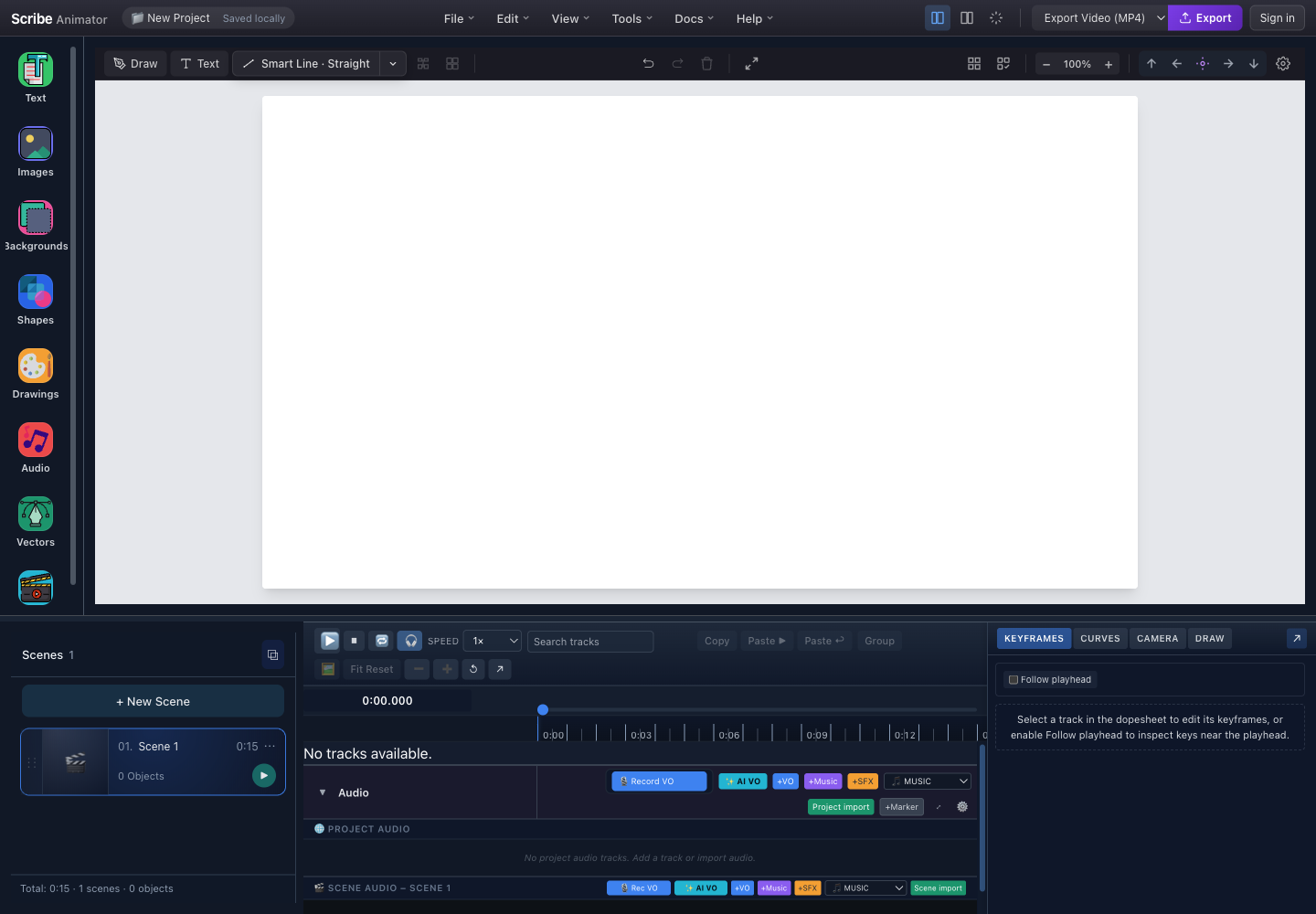
- Content toolsText, images, backgrounds, shapes, drawings, audio, and vector sources enter the active project from the left.
- CanvasObjects render, select, transform, and preview inside the active scene.
- PropertiesSelection exposes object styling, timing, camera, and feature-specific controls.
- Scenes and timelineScene duration, object timing, keyframes, draw planning, camera, and audio use one playhead.
- DeliveryThe exporter selector and action create the supported final output.
What this baseline does not mean
- It does not guarantee identical controls on Desktop and Mobile Lite.
- It does not guarantee that every browser can decode every file variant or encode video with the same path.
- It does not turn local checkpoints into cloud sync.
- It does not make local AI voiceover universally available or production-ready on every device.
- It does not promise remote collaborative editing, GIF export, or a public third-party plugin execution environment.
- It does not override the current plan and entitlement information shown by the running application.
Compatibility policy for documentation
Current task guides describe the active product. A preserved versioned guide can remain available for historical reference, but readers should use the current route unless they intentionally work with an older release.
When behavior changes:
- add a dated entry here;
- state the user-visible change, affected platforms, and migration or recovery path;
- update the detailed task guide and format/requirements tables;
- retain an older statement only when it still describes a supported version; and
- avoid assigning an original release date that cannot be verified.