Known limitations, offline use, and cloud boundaries
Scribe Animator combines local editing and rendering with optional account-backed services. “Works locally” does not mean “every dependency is available offline,” and “signed in” does not mean “every local asset is safely stored in the cloud.”
This page records the public limitations and recovery boundaries for frontend@2.0.0, with offline, procedural authoring, music, and export changes reviewed on 7 October 2026.
Local, cached, and cloud are different states
| State | What it means | What can still go wrong |
|---|---|---|
| Local project/checkpoint | Project data is stored in the current browser/app installation | Site data, app removal, private mode, OS cleanup, quota, or profile changes can remove it |
| Cached application/asset | A service worker or browser cache has a previously fetched resource | Cache eviction, version change, a missing lazy asset, or storage policy can remove it |
.scribe package | A downloaded editable project snapshot and supported packaged assets | External references, missing fonts, unsupported codecs, or version incompatibility can still warn/fail |
| Account library | A named project or media record is stored through a Scribe service | Authentication, entitlement, quota, connectivity, or a partial media upload can block it |
| Remote URL | Project data points to an external resource | CORS, expiry, deletion, authentication, or offline use can make it unavailable |
For important work, retain at least one .scribe package outside the active browser/device and test reopening it.
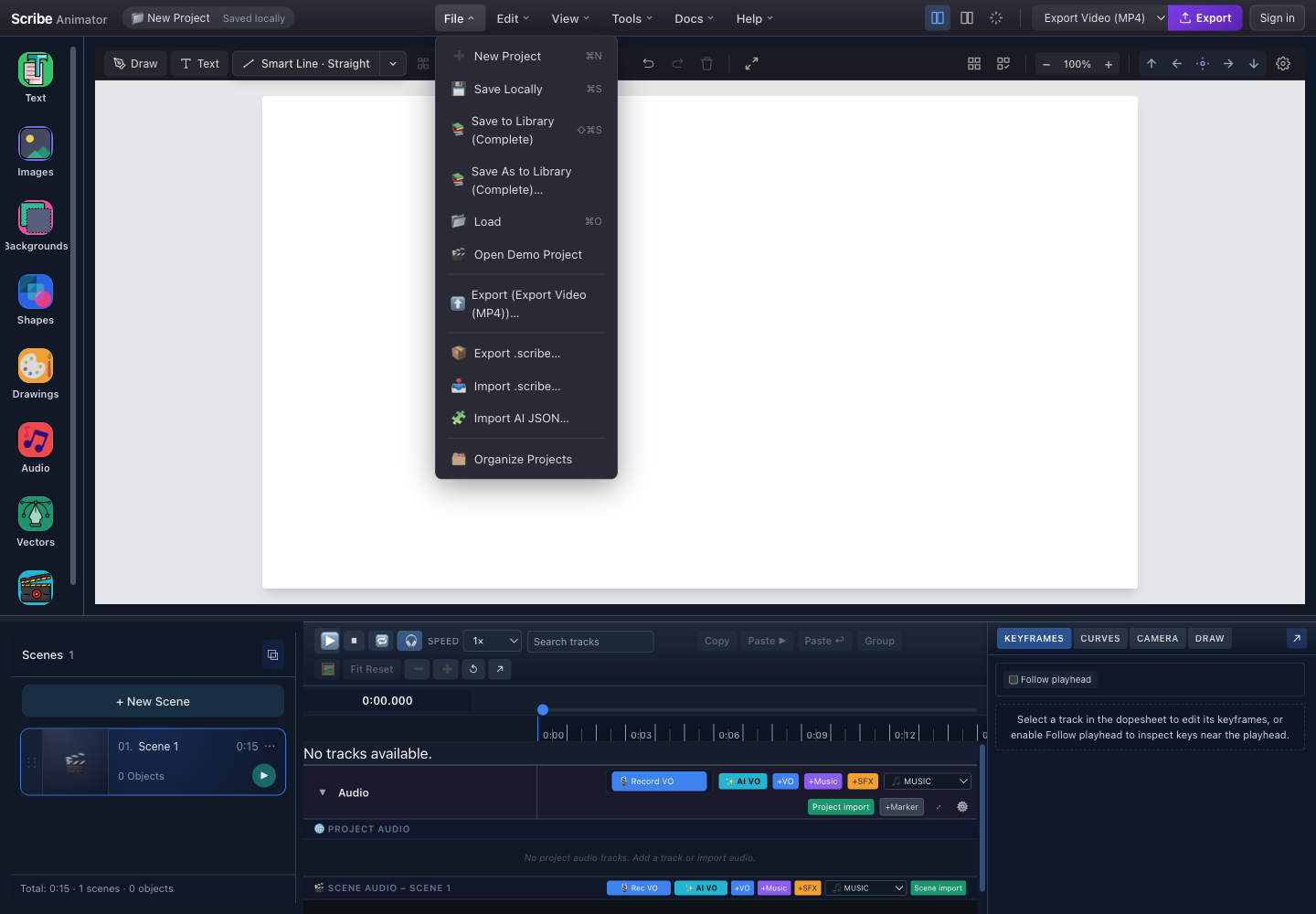
- Save LocallyCreates a checkpoint in the current browser/app storage; it is not a cloud upload.
- Complete library saveUses the account and network to create or update a library project.
- Export .scribeDownloads the portable editable boundary used for backup and handoff.
- Import .scribeValidates and then replaces the current active project; protect current work first.
What can work offline
After the production app and required assets have already loaded successfully:
- local canvas, scene, text, shape, timeline, and animation editing can continue;
- local checkpoints and projects can use browser/app storage;
- packaged or already-cached built-in resources can remain available;
- local SVG sanitization, vector work, and image preprocessing can run when their workers and WebAssembly assets are cached;
- project playback can use media that remains local and decodable; and
- locally available export paths can render without a cloud render service.
The production web app uses one service worker for the app shell and asset caching. It precaches listed build assets and can serve a previously cached application shell when navigation cannot reach the network. This is a best-effort cache, not an offline account service.
Supported public assets and selected private media can be cached under their existing policies. Private media depends on the current account context and cache freshness. Other API and telemetry requests are not cached as offline substitutes. A missing cloud listing, expired session, or uncached asset can still block a workflow.
Browser voice phonemizer data is fetched as a cacheable asset when needed; moving it out of the initial JavaScript does not eliminate the first download or guarantee that the complete voice model is available offline.
Offline behavior is not guaranteed merely because the app worked once. Test it on the actual device before relying on it in a classroom, field location, or controlled network.
What needs a network
| Capability | Why |
|---|---|
| Sign-in and OTP verification | Identity service must issue and verify the current session |
| Account project/media libraries | Listings, writes, quotas, and account ownership are service-backed |
| Cloud uploads and complete library saves | Project/media data must reach the service |
| Billing, purchase, restore, and entitlement refresh | Provider and backend state must be verified |
| First use of non-packaged assets or voice models | The resource must be acquired before local use |
| Remote URL assets | The source origin must remain reachable and permit access |
| Public asset/library search that is not packaged | Results are fetched from its current service |
| Support, legal, or external destinations | The linked page must load from its owner |
Current limitations by workflow
Project and storage
- Local checkpoints belong to one origin/app installation and do not automatically follow the user.
- Clearing site data, uninstalling, private browsing, or storage pressure can remove local state.
- A complete library save can finish with warnings when some local media cannot be promoted.
- Importing a project or project JSON can replace broad workspace state.
.scribepackages validate and package supported dependencies, but preserved external URLs are not portable guarantees.- There is no supported simultaneous multi-user editing workflow in the current public product; use a
.scribehandoff and explicit ownership instead.
Images, SVG, and fonts
- HEIC/HEIF and AVIF are not currently promised by the image decoder.
- Animated SVG, scripts, event handlers, and external interactive behavior are removed or rejected.
- SVGZ is recognized by a guarded lower-level intake, but the visible Desktop chooser does not advertise it.
- External CSS, filters, masks, unusual text layout, and unsupported SVG constructs can change during sanitization.
- Raster tracing simplifies pixels; it cannot recover detail missing from the source.
- Very detailed vectors can increase selection, render, package, preview, and stroke-planning cost.
- A font unavailable on the destination can change text metrics and wrapping unless the supported workflow preserves or outlines it.
Animation, drawing, and camera
- Preset animation, Draw Steps, visible ranges, and keyframes can produce a mixed timing result on one object.
- Draw In does not automatically create a meaningful authored Draw Step order.
- Object Camera, draw-step camera, and dedicated camera tracks share project time and can overlap; resolve conflicts rather than assuming a priority.
- Path following depends on a valid bound path and object reference.
- Complex stroke planning is a starting point; semantic drawing order can still require manual changes.
- Mobile Lite exposes a focused subset/layout, so dense keyframe and camera authoring can be easier on Desktop.
Agent-created motion and procedural objects
- Motion recipes, Clip bindings, derived anchors, shared Scene Poses, and procedural score/component authoring require the supported Desktop capability path. They are not a promise of matching Mobile Lite menus.
- A property owned by a preset, Path Follow, Scene Pose, anchor binding, or drawing score can reject an overlapping command. Review the reported owner before changing timing or placement.
- Procedural components are bounded data from a trusted catalog. Imported source cannot load arbitrary JavaScript, plugins, or external definitions.
- Clip V1 requires a valid active native rectangle, rounded rectangle, or circle source in the same scene. A transformed circle can render as an ellipse. Arbitrary SVG and image masks are outside V1.
- Generated music does not interpret the script or synchronize speech automatically. Scene-aware shaping follows authored time boundaries.
- Music generation and its temporary result run locally. Add the result to the project and retain an editable backup before closing the workspace.
The motion guide, procedural guide, and music tutorial describe recovery for these cases.
Video and screen recording
- One local video clip can be at most 60 seconds and 100 MB; the editor warns above 60 MB.
- A screen-recording session can contain multiple steps, but every step remains an independently inspectable clip with a 60-second maximum. The complete V1 session stops after five minutes of active recording.
- Screen recording is local-first. Completed temporary steps use project-local media storage and do not become visible scenes until Add to project.
- Cloud-backed saves use the normal account storage entitlement. The current Free plan's 200 MB is total cloud storage, not a per-recording allowance; recorder warnings never delete clips or stop local editing solely because cloud space is low.
- Shared/system audio depends on the browser and selected source. Microphone permission is separate and optional.
- The detached recording controller depends on Document Picture-in-Picture. Safari does not currently support the API used for that floating control window, so Scribe uses its in-editor controller instead.
- Native Android and iOS screen capture are not part of this Desktop web workflow.
- Imported and recorded clips depend on current-runtime container and codec decode support. Test playback, embedded audio, Freeze and Explain, and export before removing the source.
Audio and voiceover
- Local AI voiceover remains beta and is not universally available across devices, languages, providers, or memory budgets.
- First-use model acquisition needs a network unless the native build packages that resource.
- A file extension does not guarantee codec decode in the current browser/WebView.
- Microphone permission can be denied at browser and OS levels.
- A locally generated or recorded blob can be lost if it is neither packaged nor successfully persisted.
- Audio binding can intentionally retime animation; combining it with existing keys or Draw Steps needs a full preview.
- Hardware, browser, and encoder sample-rate behavior can expose sync differences; verify the final downloaded video.
Export
- Video export is local and can be slow, memory-intensive, and sensitive to foregrounding.
- The visible video output is MP4/H.264; WebM and GIF are not current public delivery choices.
- High resolution, high frame rate, long duration, detailed vectors, and many audio tracks multiply work.
- Plan policy can clamp requested dimensions or add a watermark.
- SVG export is unavailable in the download menu and public automation/WebMCP API.
- An exported video cannot restore editable objects.
- An export can finish differently across browsers because the encoder and audio mux path differ.
Offline preparation checklist
Before deliberately disconnecting:
- open the production app online and wait for the workspace to settle;
- open every feature you will need so its lazy code/worker can load;
- acquire required voice models and test one generation if voiceover matters;
- replace remote-only assets with packaged or local copies where permitted;
- save a local checkpoint;
- export and test a
.scribepackage; - make one short representative video export;
- disconnect and reopen the app;
- repeat the critical edit, preview, and export action; and
- keep the original sources outside browser storage.
If the offline reopening fails, reconnect and use the current app online. Do not clear caches as the first recovery step when they may contain the only available local resources.
Security and privacy boundaries
- Treat
.scribe, JSON, audio, images, and SVG as potentially sensitive project data. - Import files only from a trusted source; validation reduces risk but cannot establish content ownership.
- Do not send project packages, OTPs, access tokens, payment details, or private media in a public support message.
- A remote asset URL can disclose a request to its hosting origin.
- Account and billing services remain host-owned capabilities; local editing does not bypass their authorization.
- Scribe project import does not permit arbitrary script execution from SVG or template JSON.
Safe recovery order
When a workflow fails:
- stop playback and avoid repeated destructive clicks;
- save locally if the project is still responsive;
- export a
.scribepackage if possible; - record the platform, app/browser version, and visible error;
- retry with one small known-good file or a blank project;
- use a lower export resolution/frame rate when diagnosing encoding;
- reopen a copy rather than overwriting the only known-good project; and
- contact support only after removing secrets and unrelated private content.