Export Settings - Complete Guide
Export your whiteboard animations as high-quality videos with customizable resolution, frame rate, and quality settings. This guide covers the complete export workflow from settings to final download.
Visual orientation
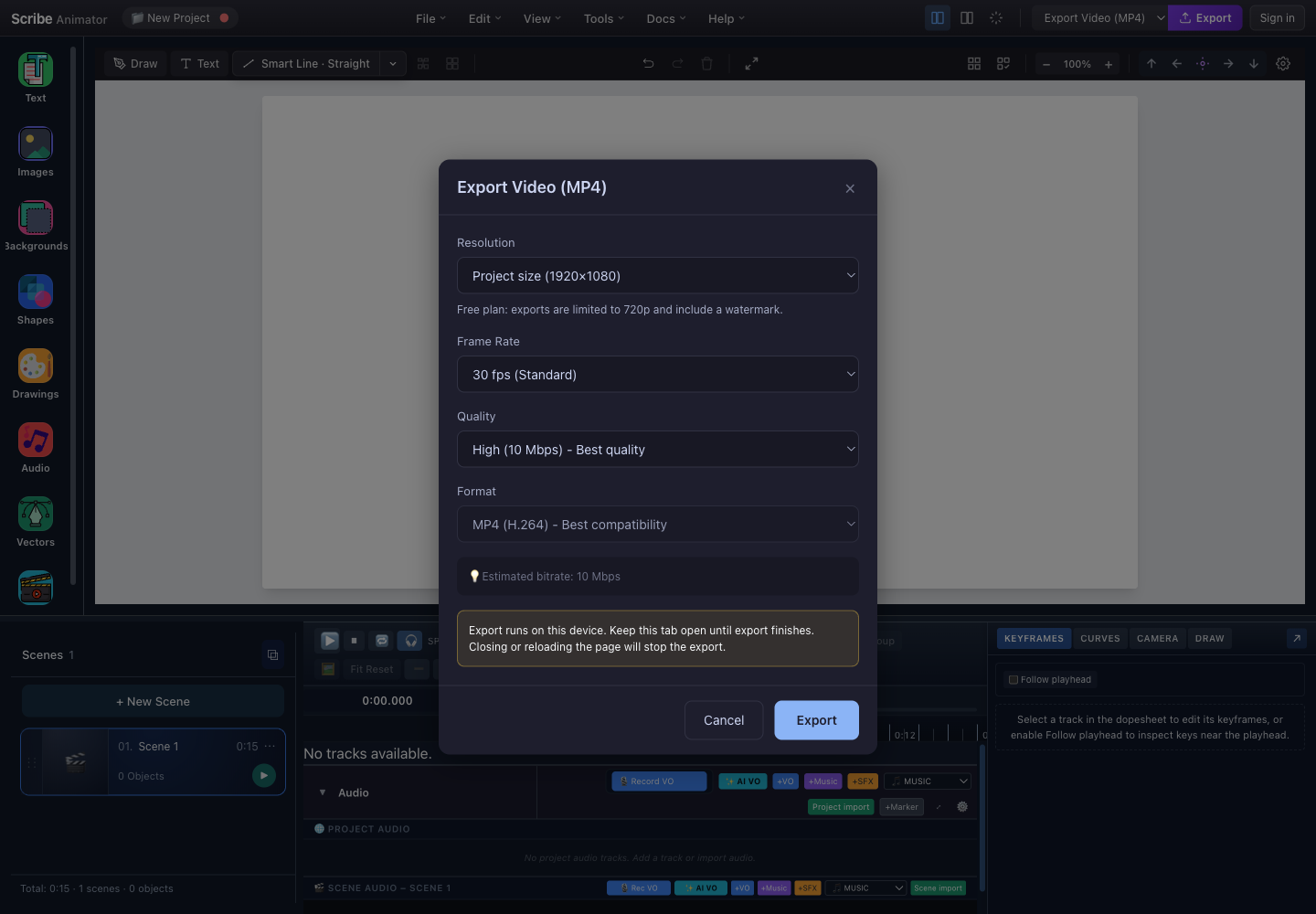
- ResolutionChoose Project size, 1080p, 720p, or 480p; plan policy can clamp the result.
- Frame rateChoose 24, 30, or 60 fps.
- QualityLow, Medium, and High map to the displayed target bitrates.
- FormatThe current video dialog produces MP4 using H.264.
- EstimateThe bitrate estimate compares compression settings; it is not a guaranteed final size.
- Local-render warningKeep this tab open and the device awake until export completes.
- ExportStarts the local frame render and encode.
This dialog and its visible settings were checked in the real local Desktop editor at 1440 × 1000 on 26 July 2026. It is not a documentation playground. The installed UI and its effective-output note take precedence over older conceptual diagrams.
For a task-based comparison of MP4, Static SVG, .scribe, and template output, see Choose and verify an export. This page focuses on video settings.
Overview
The Export system renders your animation frame-by-frame and encodes it into a video file. The hidden export stage captures each frame at your specified resolution and assembles them into an MP4 (H.264) video.
- Configure resolution, frame rate, quality, and format.
- Review the effective plan/device policy shown by the dialog.
- Start export and keep the tab open while Scribe captures and encodes each frame.
- Review the completion result, then download or save the MP4 through the current platform.
Opening the Export Dialog
Current Desktop workflow
- In the top bar, choose Export Video (MP4) in the exporter selector when multiple exporters are available.
- Choose the adjacent Export action.
- Review the dialog's effective resolution and plan note before starting.
The installed Help → Keyboard Shortcuts modal does not list a global export-dialog shortcut. Use the visible action so the selected exporter is unambiguous.
Export Dialog Interface
The annotated screenshot above is the authentic interface. Read its fields in order:
| Field | Decision |
|---|---|
| Resolution | Choose project dimensions or a video preset, then check whether policy clamps the result |
| Frame Rate | Balance motion sampling against render time and file size |
| Quality | Choose the displayed target bitrate |
| Format | Confirm the current MP4 (H.264) output |
| Estimate | Use it for comparison, not as a guaranteed final size |
| Local-render warning | Keep the tab open and the device awake |
| Export | Start the frame render and encode |
Resolution Settings
Choose your output video dimensions:
| Preset | Dimensions | Use Case |
|---|---|---|
| Project size | Current project dimensions, subject to plan clamp | Preserve the authored aspect ratio |
| 1080p | 1920 × 1080 | YouTube, presentations (recommended) |
| 720p | 1280 × 720 | Fast iteration, web sharing |
| 480p | 854 × 480 | Previews, low bandwidth |
Resolution Selection
| Selection | Approximate pixel count | Important behavior |
|---|---|---|
| Project size | Depends on the project | Uses authored dimensions, subject to the effective plan/device limit |
| 1080p | 2.1 megapixels | Strong source for YouTube and presentation delivery |
| 720p | 0.9 megapixels | Faster export for web sharing and review |
| 480p | 0.4 megapixels | Best reserved for lightweight previews |
For YouTube uploads, use 1080p at minimum. YouTube compresses videos, so higher source quality preserves more detail.
Plan Limitations
| Plan | Max Resolution | Notes |
|---|---|---|
| Free | 720p | Includes watermark |
| Pro | 1080p | No watermark |
The current entitlement model exposes Free and Pro policies. A lower maximum can still apply when the selected browser/device encoder cannot support the requested size.
Frame Rate Settings
Control animation smoothness:
| Frame Rate | Description | Best fit | File Size Impact |
|---|---|---|---|
| 24 fps | Cinema-style motion that can look slightly less fluid | Artistic or stylized content | Smallest |
| 30 fps | Standard, balanced motion | Most animations and web video | Medium |
| 60 fps | Very smooth motion and twice as many frames as 30 fps | Fast camera movement when the extra cost is justified | Largest |
Frame Rate Selection
Choose 30 fps unless the delivery requirement clearly calls for a film-style 24 fps cadence or the additional smoothness of 60 fps. Preview the actual project before deciding; more frames cannot repair abrupt keyframes or poor easing.
Higher frame rates double or triple export time and file size. Use 30 fps unless you have specific requirements for smoother motion.
Quality Settings
Control video bitrate and file size:
| Quality | Bitrate | Use Case | Approximate size per minute at 1080p |
|---|---|---|---|
| Low | 2 Mbps | Small files and disposable web previews; detailed areas can show artifacts | 15 MB |
| Medium | 5 Mbps | Balanced quality and size; complex scenes can still show compression | 38 MB |
| High | 10 Mbps | Sharpest fine strokes and minimal compression artifacts | 75 MB |
Bitrate Comparison
Bitrate is a target rather than a visual-quality guarantee. Fine lines, texture, rapid motion, and many simultaneous changes are harder to compress than large static regions. Make a short representative test export before committing to a long final render.
Avoid Low quality for final deliverables. Low bitrate causes visible compression artifacts, especially on thin strokes and detailed SVG paths.
Format Settings
Scribe Animator currently exports MP4 (H.264) only. This provides the best compatibility across browsers and mobile apps.
Export Progress
Progress Modal
During export, use the visible progress percentage, completed/total frame count, elapsed time, and remaining-time estimate to judge progress. Estimates can move as scene complexity changes. Use the visible Cancel action if you must stop; keep the tab active until cancellation or completion is confirmed.
Export Phases
| Phase | Description |
|---|---|
| Settings | Configure export options |
| Exporting | Rendering frames (shows progress) |
| Complete | Download ready |
| Error | Export failed (shows error message) |
Export Complete
Success State
When export completes:
- Confirm that the result reports the expected filename, effective resolution, duration, size, and render time when those fields are available.
- Choose Download or the platform's native save/share action.
- Open the saved MP4 outside Scribe.
- Check the beginning, a complex middle section, the end, audio sync, hand animation, and camera movement before delivery.
Browser Compatibility
The current exporter targets MP4 (H.264), but encoder, audio-mux, download, and native-save capabilities differ by browser and device. The dialog can open even when a later encoder capability check fails, so always make a short test export on the delivery device. WebM is not exposed as an end-user video format in the current dialog.
Support Matrix
| Platform | MP4 (H.264) | Notes |
|---|---|---|
| Chrome (desktop) | ✅ | Uses WebCodecs for MP4 |
| Edge (desktop) | ✅ | Same as Chrome |
| Firefox (desktop) | ✅ | Uses WebCodecs for MP4 (with audio mux fallback if needed) |
| Safari (macOS) | ✅ | Uses WebCodecs video + ffmpeg.wasm audio muxing |
| iOS app (Capacitor) | ✅ | Uses native iOS encoder (AVAssetWriter) with MediaRecorder fallback |
| Android app (Capacitor) | ✅ | Chromium WebView; similar to Chrome/Edge |
Implementation Notes (High-Level)
- MP4 (H.264) uses WebCodecs (
VideoEncoder) for deterministic frame timing. - Audio muxing differs by runtime:
- Chromium/Firefox: WebCodecs
AudioEncoder+ MP4 muxing. - Safari (macOS): WebCodecs video +
ffmpeg.wasmfor WAV → AAC + muxing. - iOS: the native encoder saves the result and makes it available through the system share sheet or Files app.
- Chromium/Firefox: WebCodecs
Recommended Settings
For YouTube
| Setting | Value |
|---|---|
| Resolution | 1080p (1920×1080) |
| Frame Rate | 30 fps |
| Quality | High (10 Mbps) |
| Format | MP4 |
For Fast Previews
| Setting | Value |
|---|---|
| Resolution | 720p (1280×720) |
| Frame Rate | 30 fps |
| Quality | Medium (5 Mbps) |
| Format | MP4 |
For Professional Delivery
| Setting | Value |
|---|---|
| Resolution | 1080p when the Pro policy and device allow it |
| Frame Rate | 30 fps (or 24 for cinema) |
| Quality | High (10 Mbps) |
| Format | MP4 |
For Web Embedding
| Setting | Value |
|---|---|
| Resolution | 720p (1280×720) |
| Frame Rate | 30 fps |
| Quality | Medium (5 Mbps) |
| Format | MP4 |
File Size Estimation
Approximate file sizes at High quality:
| Resolution | 30 sec | 1 min | 5 min |
|---|---|---|---|
| 1080p | ~38 MB | ~75 MB | ~375 MB |
| 720p | ~17 MB | ~35 MB | ~175 MB |
| 480p | ~8 MB | ~15 MB | ~75 MB |
Actual file sizes vary based on animation complexity. Simple animations compress better than detailed scenes with many simultaneous animations.
Pre-Export Checklist
Before exporting, verify these items:
- Preview the entire animation with Play.
- Check that every scene renders correctly.
- Verify audio synchronization when audio is present.
- Confirm that hand animations finish correctly.
- Check that camera movements are smooth.
- Resolve every missing or broken asset.
- Save the project before exporting.
- Optionally export a short representative test.
- Inspect fine-stroke sharpness in that test.
Troubleshooting
Export Fails Immediately
| Cause | Solution |
|---|---|
| Browser not supported | Switch to Chrome or Edge |
| Insufficient memory | Close other tabs, reduce resolution |
| Project not saved | Save project and try again |
Export Stalls at Percentage
| Cause | Solution |
|---|---|
| Complex scene rendering | Wait longer, or simplify scene |
| Memory exhausted | Export in smaller segments |
| Browser tab inactive | Keep tab focused during export |
Video Has Missing Frames
| Cause | Solution |
|---|---|
| Animation not precomputed | Play through animation before export |
| Worker timeouts | Reduce animation complexity |
| Browser throttling | Keep browser tab active |
Audio Out of Sync
| Cause | Solution |
|---|---|
| Variable frame rate | Use constant frame rate (30 fps) |
| Audio loaded late | Ensure audio fully loaded before export |
| Timeline mismatch | Verify audio track timing in timeline |
Low Quality Output
| Cause | Solution |
|---|---|
| Low quality setting | Use "High" quality |
| Low resolution | Use the highest effective resolution allowed by the current plan |
| Heavy compression | Check upload platform re-encoding |
Blurry Strokes
| Cause | Solution |
|---|---|
| Resolution too low | Use the highest effective resolution allowed by the current plan |
| Quality too low | Use High (10 Mbps) bitrate |
| Scaled-up content | Use source SVGs at export resolution |
Export Telemetry
The export system tracks these events for diagnostics:
| Event | Data |
|---|---|
export.start | Settings, timestamp |
export.progress | Completed frames, total frames |
export.complete | Duration, bytes, frame count |
export.error | Error message, phase |
Keyboard Shortcuts
The current editor exposes export through the top-bar exporter selector and Export action. While the settings view is open, Escape can close it. Once rendering has started, use the visible progress/cancel controls and do not assume Escape or Enter will stop or start an encode.
Best Practices
For Sharp Lines
- Export at the highest effective resolution allowed by the current plan, up to 1080p
- Use High quality (10 Mbps)
- Ensure source SVGs are vector, not rasterized
For Smooth Animations
- Use 30 fps minimum
- Precompute LUTs before export (Play through once)
- Keep browser tab active during export
For Small File Sizes
- Use 720p for web sharing
- Use Medium quality for previews
- Keep animations under 2 minutes per export
For Consistent Results
- Use a currently supported browser or the native app and complete a short test first
- Close unnecessary browser tabs
- Don't switch tabs during export